Eyeglass to ServiceNow Application Service Dashboard for Disaster Recovery Status
Support Statement
This documentation is provided "as is" without support for 3rd party software. The level of support for this integration guide is best effort without any SLA on response time. No 3rd party product support can be provided by Superna directly. 3rd party components require support contracts. See EULA for more details.
Overview
Application Service in ServiceNow is a set of interconnected applications and hosts configured to deliver a service to an organization. ServiceNow applications refer to devices and applications that comprise an application service as configuration items (CIs). The various CIs and the relationships between them are stored in the Configuration Management Database (CMDB).
This guide describes the configuration of ServiceNow Application Services for PowerScale Share and Export Protection Status. Based on the PowerScale SyncIQ Replication and Eyeglass Configuration Replication, SMB Share and NFS Export on the PowerScale Cluster has a Protection Status (UNPROTECTED, ACTIVE, or BACKUP). This status indicates whether an SMB Share or NFS Export is protected — when data is replicated to a DR PowerScale Cluster and the share or export configuration is replicated by Eyeglass. It also indicates whether the copy of data is the active (read/write) or backup (read-only) data.
The Protection status is part of the CI attributes, and it is updated when there is a change in the PowerScale Share or Export failover status collected by Eyeglass and synchronized to the CMDB. This change is also reflected in the Application Service property for the related share or export.
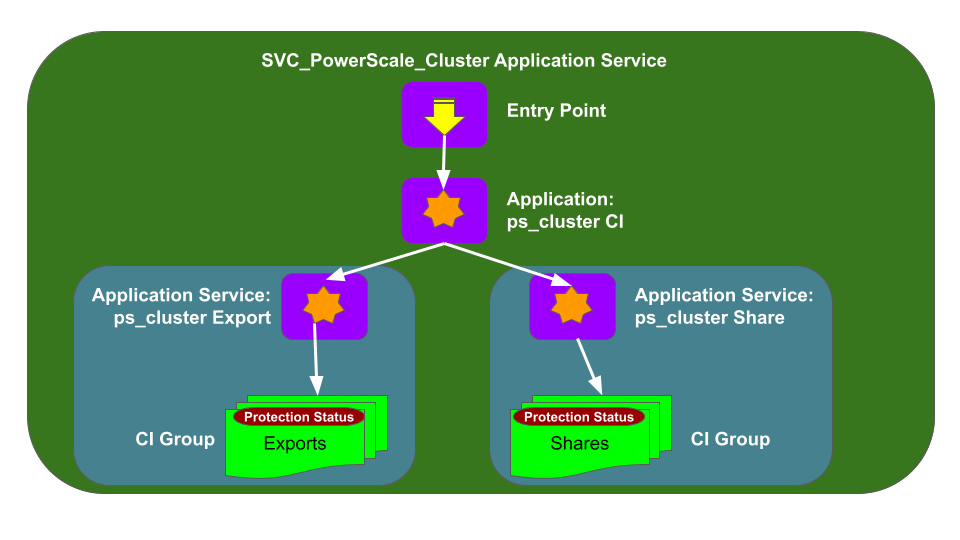
Eyeglass and ServiceNow Application Service
Through the Data Source Import process, Eyeglass inventory data — including PowerScale SMB Shares and NFS Exports — is imported into the ServiceNow CMDB and updated on a schedule. See the Eyeglass ServiceNow CMDB integration guide for more details. Based on the PowerScale SMB Share and NFS Export CIs in the CMDB, Application Services are created in ServiceNow.
These are the procedures:
- Configure CMDB Groups for SMB Share and NFS Export
- Create an Application Service per PowerScale Cluster
- Create Application Services for SMB Share from a Dynamic CI Group
- Create Application Services for NFS Export from a Dynamic CI Group
- Add SMB Share and NFS Export CIs to PowerScale Cluster CIs in the Application Service Map
Configure CMDB Groups for SMB Share and NFS Export
Typically there are many SMB Shares and NFS Exports configured on a PowerScale Cluster. Create a CMDB Group for SMB Share CIs and another CMDB Group for NFS Export CIs for each PowerScale Cluster CI.
- Navigate to All → Configuration → CMDB Groups.
- In the CMDB Groups pane, click New.
- Fill in the Group Name and Description fields, then click Submit.
- Open the newly created group and set Encoded Queries to specify the CIs to include based on your criteria. Click New.
- Specify the CI Class and set the condition.
- Click Submit.
- Repeat for the NFS Export group and for each additional PowerScale Cluster.
Create an Application Service per PowerScale Cluster
- Navigate to All → Configuration → Application Services.
- Click New to create a new Application Service.
- Specify the Application Service Name (required) and any optional parameters. The number is generated automatically.
- Click Next.
- Under Populate the Application Service, click Choose a Method.
- Select Manual as the method, then select the CI Class and the PowerScale CI.
- Click Save.
- Click Next.
- Repeat for each PowerScale Cluster CI.
Create Application Services for SMB Share from Dynamic CI Group
- Navigate to All → Configuration → Application Services.
- Click New to create a new Application Service.
- Specify the Application Service Name (required) and any optional parameters.
- Click Next.
- Under Populate the Application Service, click Choose a Method.
- Select Dynamic CI Groups as the method, then select the PowerScale CI Group for Shares.
- Click Save.
- Click Next.
- Repeat for each PowerScale Cluster CI.
Create Application Services for NFS Export from Dynamic CI Group
- Navigate to All → Configuration → Application Services.
- Click New to create a new Application Service.
- Specify the Application Service Name (required) and any optional parameters.
- Click Next.
- Under Populate the Application Service, click Choose a Method.
- Select Dynamic CI Groups as the method, then select the PowerScale CI Group for Exports.
- Click Save.
- Click Next.
- Repeat for each PowerScale Cluster CI.
Add SMB Share and NFS Export CIs to PowerScale Cluster CIs in the Application Service Map
Once all required Application Services are created, create the service map to link the SMB Share and NFS Export Application Services to the PowerScale Cluster Application Service.
- From the Application Services UI, open the configuration for the PowerScale Cluster Application Service.
- Click View Map.
- Verify that the map is in Edit Mode. If it is in View Mode, click Edit.
- Right-click the PowerScale Cluster icon and select Add a CI.
- In the Add a CI window, set CI Type to Dynamic CI Group and set CI Name to the Dynamic CI Group for the SMB service. Click Add.
- Repeat to add the Dynamic CI Group for the Export service.
- Select Action → Approve Service Map to complete the mapping configuration.
- Repeat for each PowerScale Cluster Application Service.
Application Services — View Properties
Once Application Services are configured, view the relevant properties for each share and export by switching the Application Services Map View to the relevant service.
Click the dropdown arrow to switch to the correct application service view, then select the SMB Share or NFS Export to view the Properties View, including the SMB Share Status (for example, BACKUP).
Share and Export Protection Status
There are three protection status values:
| Status | Description |
|---|---|
| UNPROTECTED | SMB Share or NFS Export is not protected — data is not replicated by a SyncIQ policy, or configuration is not replicated by an Eyeglass Configuration Replication job |
| ACTIVE | SMB Share or NFS Export is protected (data and configuration replicated) and this is the active (read/write) copy of data |
| BACKUP | SMB Share or NFS Export is protected and this is the backup/replicated (read-only) copy of data |
Share and Export Protection Status Updates
Protection status is updated when there are changes on the PowerScale Cluster. Changes appear in the Application Service Share or Export Properties after Eyeglass scheduled jobs update the inventory file and ServiceNow runs transform tasks to update the CMDB.
| Status Transition | Trigger |
|---|---|
| UNPROTECTED → ACTIVE | SyncIQ policy and Eyeglass Configuration Replication job configured to protect the share or export; also creates a new CI for the target cluster with status BACKUP |
| ACTIVE → BACKUP | Failover from source to target cluster changes the source cluster share or export status |
| BACKUP → ACTIVE | Failover from source to target cluster changes the target cluster share or export status |