Ivanti Neurons for Enterprise Service Management Zero Trust Integration
Support Statement
This documentation is provided "as is" without support for 3rd party software. The level of support for this integration guide is best effort without any SLA on response time. No 3rd party product support can be provided by Superna directly. 3rd party components require support contracts. See EULA for more details.
Overview
Ivanti Neurons for Enterprise Service Management is an ITSM platform. This integration creates tickets based on Data Security Edition detections.
Solution Overview
Superna Zero Trust API receives webhook alerts and parses the key data into HTTPS API payload events that are sent to the Ivanti Neurons endpoint URL. Ivanti Neurons for Enterprise Service Management is a modular architecture that provides real-time visibility of your IT infrastructure, which you can use for threat detection and prioritization.
Advanced Zero Trust Capabilities
- Webhook to native HTTPS collector API case creation
- Supports custom ticket category creation of type problem
- Updates to the state of a problem apply a journal note to an existing ticket using the Superna event ID to locate the existing case that matches the event in Data Security Edition
What Is Ivanti Neurons for Enterprise Service Management?
Ivanti Neurons for Enterprise Service Management is an AI-powered, cloud-based platform that unifies IT and other business services (like HR and Facilities) onto a single system, using automation to streamline workflows, improve employee experiences, and manage assets across the entire enterprise, extending traditional IT Service Management (ITSM) beyond just IT.
Integration Architecture
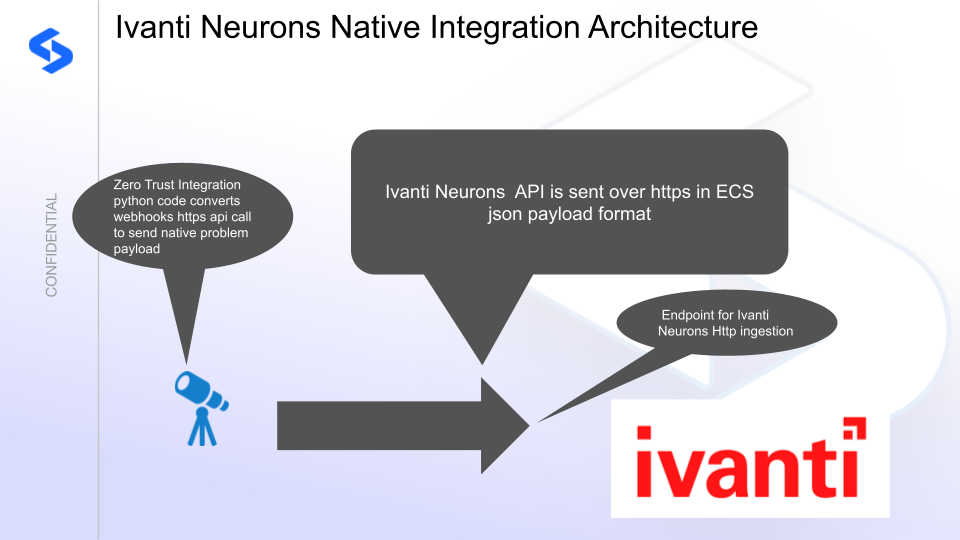
Solution Configuration in Ivanti and Data Security Edition Zero Trust
Prerequisites
- Installed Security Edition
- Eyeglass OS appliance version 15.5 — verify with
cat /etc/os-release - License key for the Zero Trust API
- Ivanti Neurons for Enterprise Service Management with a service account configured for creating tickets
Configuration in Ivanti Neurons for Enterprise Service Management
- Log in to the Ivanti Neurons console.
- Open the settings panel.
- Under Security Controls, select API Keys.
- Add a new key and fill in the required fields.
- Record the Reference ID.
- Record the instance URL.
Both values are used to update the integration code below.
Configuration Steps on Eyeglass Virtual Machine
High-Level Steps
- Create the Python location to run the application on the Eyeglass VM.
- Create the Python main application script.
- Create the Linux systemd service and set it to auto-start.
- Create the Zero Trust configuration in Data Security Edition.
- Update the main script to customize it with the Ivanti Python code.
- Test the script is running as a service.
- Create a test event in Defender to validate alerts appear as tickets in Ivanti Neurons.
Configure the Service Start and Python Integration Files
Log in to the Eyeglass VM via SSH as the admin user:
ssh admin@<your-vm-ip>
Become root:
sudo -s

mkdir -p /opt/superna/cgi-bin

chown -R sca:users /opt/superna/cgi-bin

chmod -R u+rwX,g+rwX /opt/superna/cgi-bin
Switch to the SCA user:
sudo -u sca -s

cd /opt/superna/cgi-bin
Create a Python virtual environment for the integration:
python3 -m venv venv-ivanti

source venv-ivanti/bin/activate
Install required Python packages:
pip install flask requests

deactivate
Create integration script files:
touch ivanti.py

touch ivanti.sh

chmod +x ivanti.py

chmod +x ivanti.sh
Create the ivanti.sh launch script:
nano /opt/superna/cgi-bin/ivanti.sh
Paste the following content into the file:
#!/bin/bash

export PATH="/opt/.pyenv/bin:$PATH"

source /opt/superna/cgi-bin/venv-ivanti/bin/activate

exec python /opt/superna/cgi-bin/ivanti.py
Make the script executable:
chmod +x /opt/superna/cgi-bin/ivanti.sh
Exit back to root:
exit

whoami # confirm you are root
Create the systemd service unit file:
nano /etc/systemd/system/ivanti.service
Paste the following content into the file:
[Unit]
Description=Webhook listener for Zero Trust API translations and integrations
After=network.target

[Service]
Type=simple
User=sca
Group=users
WorkingDirectory=/opt/superna/cgi-bin
ExecStart=/bin/bash /opt/superna/cgi-bin/ivanti.sh
Restart=always
RestartSec=5

[Install]
WantedBy=multi-user.target
Reload systemd to register the new service:
systemctl daemon-reload
Enable the service to start on boot (do not start it yet):
systemctl enable ivanti
Configure Python Packages and Customize the Integration Code
-
Download the Python template code from the link to download (right-click, save as).
-
Open the Python template file in a text editor. Only replace the placeholder values — do not delete any commas.
-
Locate the following section and replace the placeholder values with the domain name for your instance access URL and the API key Reference ID recorded above:
IVANTI_TENANT_URL = "https://xxxxx/".rstrip("/")
IVANTI_REST_API_KEY = "yyyyyy" -
Open the production file on the Eyeglass VM:
nano /opt/superna/cgi-bin/ivanti.py -
Open the template file locally in Notepad, select all (Ctrl+A), and copy.
-
Paste the clipboard into the SSH terminal session with the open nano editor.
-
Save the file:
- Press Ctrl+X
- Answer Yes to save and exit
-
Start the service and verify it is running:
systemctl start ivanti

systemctl status -l ivanti
Verify the service returns "active and running". If the service does not start, do not proceed — double-check the steps above.
Configure Defender Zero Trust Webhooks
-
Configure the Zero Trust endpoint in the Ransomware Defender Zero Trust tab.
Recommended ConfigurationSend only Critical and Major events, and only webhooks that set lockout or delayed lockout. The goal is to send findings rather than a list of alarms that do not pinpoint a security incident. Customers can customize based on specific requirements.
-
The endpoint URL uses localhost and sends webhooks to the application service listening on port 5000:
http://localhost:5000/webhook -
Add the following headers to complete the webhook configuration:
- Content-Type:
application/json - content-encoding:
gzip
- Content-Type:
-
Click Save to commit the configuration.
-
Click Save on the main Webhook configuration page.
How to Test the Integration with Ivanti
- Get the IP address of the Eyeglass VM.
- Download the curl command template and open it with a text editor. Locate the IP address of Eyeglass at the very end of the text and replace it with the IP address of your Eyeglass VM.
- Copy all the text in the text editor.
- SSH to the Eyeglass VM as the admin user.
- Paste the entire CLI command to the SSH prompt to send sample data to the running Zero Trust application. This sends test data directly to the application to be processed and sent to Ivanti.
A successfully processed webhook test returns the following text in the SSH terminal:
done sending event to ivanti and check for http 200 and success count in response
To review the process logs from the web application:
sudo -s

journalctl -f -u ivanti
To log to a file and review with nano, showing only the most recent 250 lines:
journalctl -f -n 250 -u ivanti > /tmp/ivanti.log

nano /tmp/ivanti.log
The response code from the Ivanti API call should show HTTP 200 status code and successCount 1 to indicate the ticket was successfully created.
Ivanti Neurons SecOps Administrators Integration Experience
Once the integration is complete, example tickets created by the integration are visible in the Ivanti Neurons console with ticket status and details populated from the Superna Zero Trust event payload.