Google Security Operations (SecOps) Chronicle SOAR Zero Trust Integration
Support Statement
This documentation is provided "as is" without support for 3rd party software. The level of support for this integration guide is best effort without any SLA on response time. No 3rd party product support can be provided by Superna directly. 3rd party components require support contracts. See EULA for more details.
Overview
Customers using Google Security Operations (SecOps) Chronicle SOAR can leverage a native integration that can be installed and configured directly from the Chronicle marketplace. Customers can augment the capabilities of Chronicle SOAR with threat intelligence and Cyber Storage capabilities of Superna Security Edition.
Solution Overview
Superna Zero Trust Integration allows customers to install the Superna Zero Trust playbooks from the Chronicle marketplace and run playbooks from Chronicle incidents.
Advanced Zero Trust Capabilities
The playbooks provide the following use cases:
- Snapshot critical NAS data
- Lock out a user from NAS storage
- Unlock a user from NAS storage that was previously locked out
What Is Google Security Operations (SecOps) Chronicle SOAR?
Chronicle SOAR is a cloud service, built as a specialized layer on top of core Google infrastructure, designed for enterprises to privately retain, analyze, and search the massive amounts of security and network telemetry they generate.
Integration Architecture
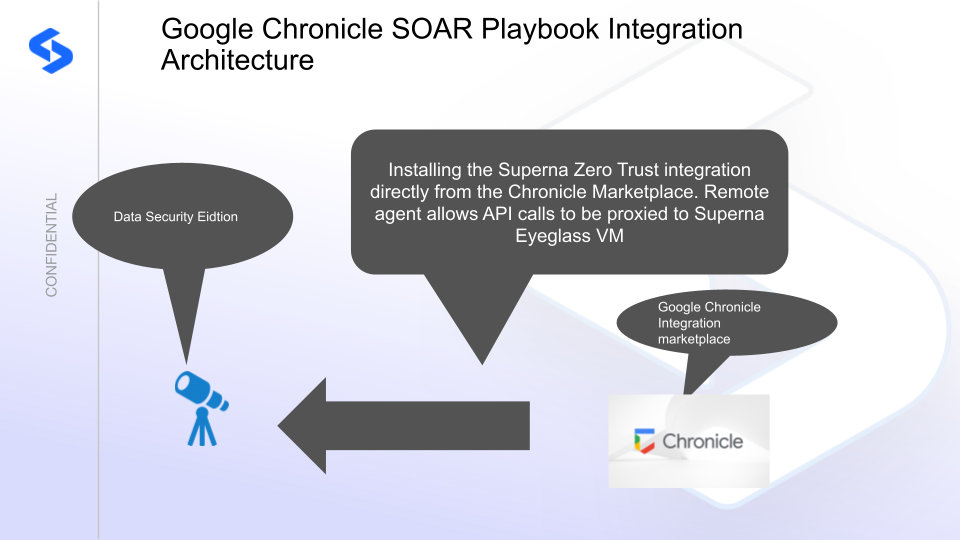
Solution Configuration in Chronicle SOAR and Defender Zero Trust
Prerequisites
- Installed Security Edition
- Eyeglass OS appliance version 15.5 — verify with
cat /etc/os-release - License key for the Zero Trust API
- Google Security Operations (SecOps) Chronicle SOAR
Configuration in Chronicle SOAR
Method 1: Direct Import
To import the integration from source files:
- Download the integration zip file.
- Open the IDE tab within the Responses menu.
- Select the downloaded zip file to import.
Use only this method OR the marketplace method — not both.
Method 2: Marketplace
Only use this option if you did not follow the direct import method above.
-
Open the Chronicle SOAR Marketplace and search for Superna.
-
Click the gear icon to install into your account.
-
Enter the IP address of the Eyeglass VM and an API token created from the Eyeglass admin desktop Main menu → Superna Eyeglass API menu.
-
Enter a description, select Run remotely, and select the agent that proxies API calls to the Eyeglass VM.
noteThe remote agent must already be installed and registered with the Chronicle portal before completing this step.
-
Once installed into your portal, three playbooks become available.
How to Test the Integration with Chronicle SOAR
The integration uses a ping validation that uses the remote agent to issue an Eyeglass health check API call that validates the IP address and API token are correct. It also validates that the remote agent can reach the VM and no firewall is blocking access.
To run the ping test:
- Using the Marketplace integration gear box, click Test remotely.
- A green checkmark indicates success.
- If you get a red X, hover over it to get the error code.
Common issues:
- Firewall blocking traffic between the remote agent and the Eyeglass VM
- Incorrect Eyeglass IP address
- Invalid API token
How to Use the Playbooks within an Incident
- For an incident, select Actions and filter on Superna.
- Select a playbook to execute.
- The lockout and unlock playbooks require a username in one of the following formats:
domain\usernameusername@<DNS AD domain FQDN>