Active Directory Planning for Lockout
Introduction
This page covers a specific Active Directory planning consideration for SMB lockout: how lockout scope is affected by shares that grant access to the Everyone well-known group in multi-domain environments.
How lockout scope is determined
The lockout process identifies every share the affected user has permission to access, based on searching all shares in all access zones on all clusters managed by Eyeglass, and applies a real-time DENY permission to each one.
The Everyone group in multi-domain environments
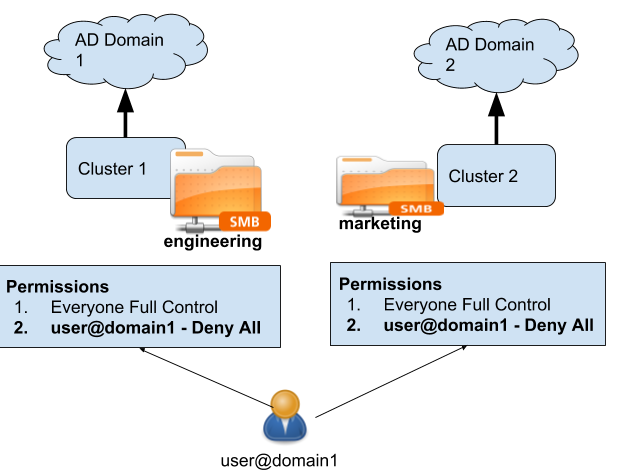
This has a specific implication for shares that grant access to the Everyone well-known group in multi-domain Active Directory environments — for example:
-
Trusted AD Domains — parent and child domains are members of the same forest, with an existing trust relationship.
-
Untrusted AD Domains — two domains are not members of the same forest, and no trust relationship exists between them.
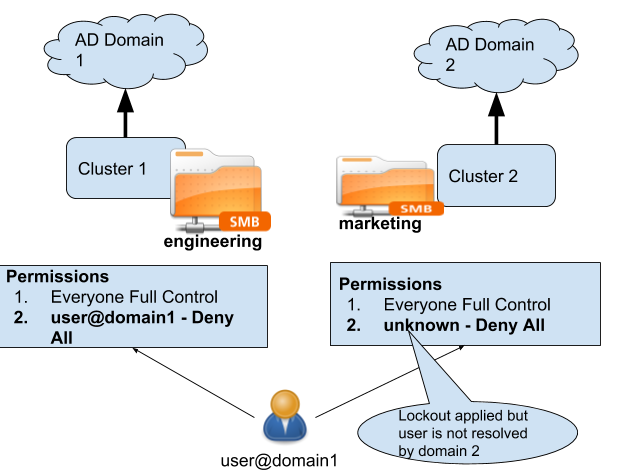
In both scenarios, lockout is applied to Everyone shares regardless of which domain the affected user account belongs to. Eyeglass has no way to confirm whether two domains trust each other at lockout time, so it locks out all Everyone shares unconditionally — this is deliberately more conservative (locks out shares that may not need it) rather than risking a gap in coverage by skipping shares based on an assumed trust relationship.
Planning implication
If your environment uses the Everyone group extensively across multiple AD domains, expect a lockout event to deny access to all of those shares, not just shares scoped to the affected user's own domain. Review your Everyone-group share usage before enabling enforcement mode broadly, and consider scoping share permissions to specific AD groups instead of Everyone where lockout blast radius is a concern.
See also
- Lockout Settings — SMB lockout — How SMB lockout is applied and restored.
- Threat Detection and Severity Settings — Monitor mode vs. enforcement mode — Deciding when to move from Monitor to Enforcement mode.
- AD User SID Resolution — How SIDs are resolved to friendly names via PowerScale Authentication providers, shared across all ECA-based products.