Backup and DR for Audit Database with SyncIQ to a Remote Cluster
Introduction
This procedure protects the Easy Auditor / Ransomware Defender audit database by replicating it with SyncIQ to a remote PowerScale cluster, giving you both an off-cluster backup and a disaster recovery copy at the same time.
Prerequisites
Follow the ECA Cluster Failover Configurations prerequisites and prepare the DR cluster before following this guide — complete every step in that guide's Prerequisites for Both Scenarios section first.
Replicate the Audit Database with SyncIQ
- Create a SyncIQ policy on the production cluster to replicate the audit database to a directory under the HDFS root directory, on a schedule, to the target DR cluster. Example:
- HDFS root directory:
/ifs/data/igls/analyticsdb/ - SyncIQ policy source path:
/ifs/data/igls/analyticsdb/eca1/ - SyncIQ policy target path on the remote cluster:
/ifs/data/igls/analyticsdb/eca1/ - Recommended schedule: once a day at noon, 7 days a week
- HDFS root directory:
- Complete the policy's configuration name, description, and target host properties.
- Run the policy after it is created to copy the database.
- Verify the policy completes successfully.
Use the Replicated Copy and Fail Over to the Warm Standby ECA Cluster
This procedure assumes an ECA cluster is deployed at the remote site to use the database copy and monitor the DR cluster after failover — see ECA Cluster Failover Configurations, Scenario 2: ECA Cluster Fails Over to a Warm Standby. All of that scenario's prerequisites are assumed complete before starting here.
Procedure to mount the audit database with the Warm Standby ECA:
-
Fail over the audit database's SyncIQ policy using the Failover Wizard on the Disaster Recovery Failover page (Policy Failover configuration, Execute a Failover to run it). This automates the SyncIQ policy failover and configures reverse replication.
noteThe legacy Eyeglass UI called this tool DR Assistant; it's now the Failover page's Failover Wizard.
-
After the failover succeeds, the DR cluster's copy of the audit database becomes writable, and reverse replication re-protects the audit database going forward.
-
Bring up the Warm Standby ECA cluster at the DR site:
-
SSH to ECA master node (node 1).
-
Log in as
ecaadmin. -
Run:
ecactl cluster up
noteDuring cluster up, uncommitted transactions are replayed to the database — you can watch this from the HBase Region Server GUI logs at
http://x.x.x.x:16030(wherex.x.x.xis ECA node 1). The logs show the write-ahead log being split and regions being initialized, for example:Splitting log file hdfs://isilon400.rnsm01.superna.net:8020/eca/WALs/hbase-rs.node1.eca-250-be.eca.local,16020,...-splitting/...
Initializing region user,...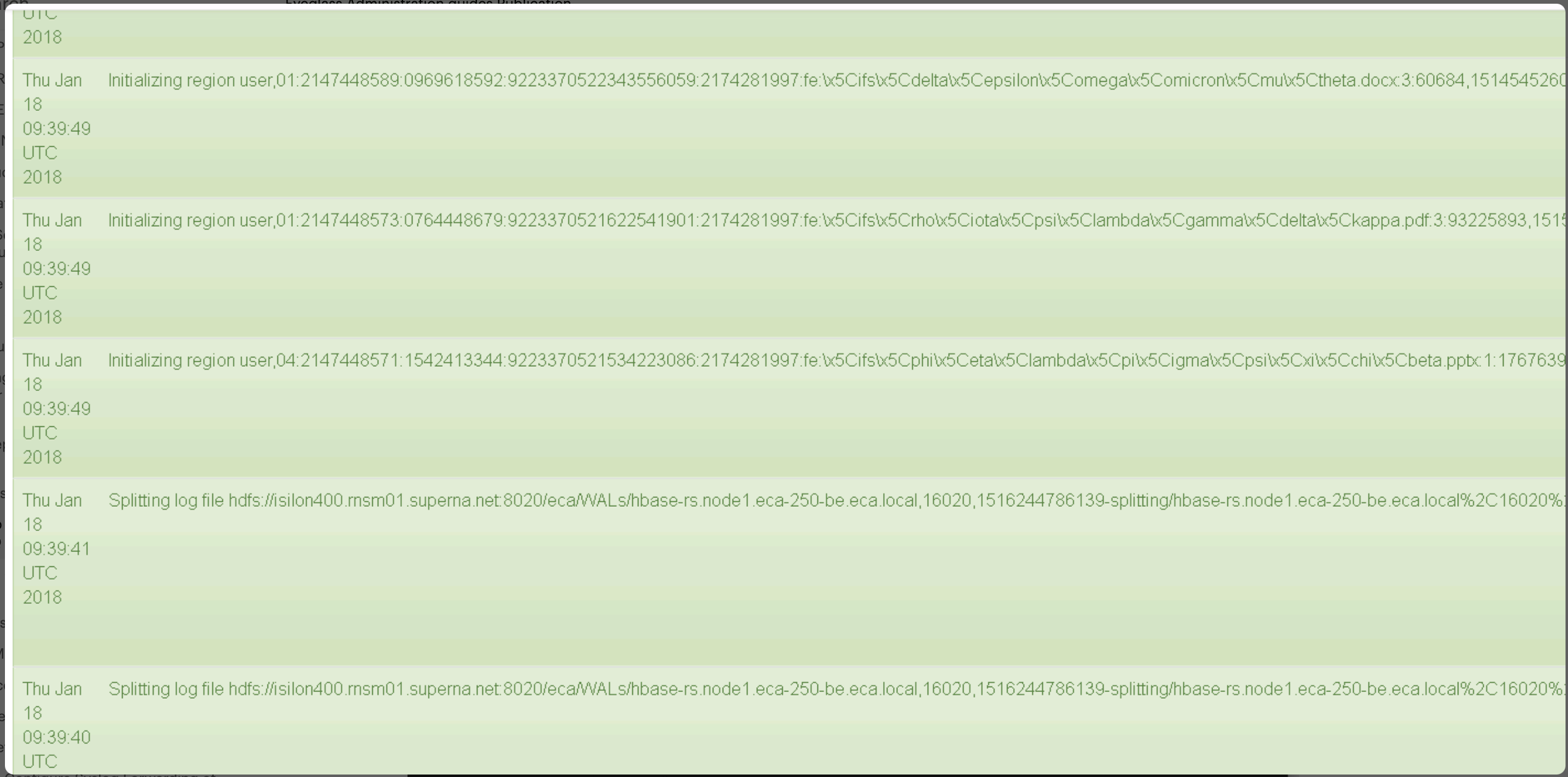
This delays the cluster-up process while the database replays transactions.
-
-
Verify the ECA cluster is up and the audit database status returns no error:
ecactl db shellThen type
statusand press Enter. No error messages should be returned, for example:ecaadmin@demoeca-1:~> ecactl db shell
Picked up JAVA_TOOL_OPTIONS: -XX:+UnlockExperimentalVMOptions -XX:+UseCGroupMemoryLimitForHeap -XX:MaxRAMFraction=1
HBase Shell
Use "help" to get list of supported commands.
Use "exit" to quit this interactive shell.
Version 1.4.9, rd625b212e46d01cb17db9ac2e9e927fdb201afa1, Wed Dec 5 11:54:10 PST 2018
hbase(main):001:0> status
1 active master, 1 backup masters, 5 servers, 0 dead, 7.0000 average load
hbase(main):002:0>
See Also
- How to Backup and Restore an Audit Database — local, same-cluster backup and restore using scheduled snapshots.
- ECA Cluster Failover Configurations — full prerequisites and both supported ECA failover scenarios.
- ECA High Availability — ECA cluster redundancy within and between nodes.
- Policy Failover — SyncIQ policy failover prerequisites and setup.
- Execute a Failover — running and monitoring a failover with the Failover Wizard.