Troubleshooting Failover
Failover Recovery Procedures
If a failover does not complete all steps successfully, refer to the Eyeglass Failover Recovery Procedures to assess the state of your environment and follow the necessary recovery steps.
Collecting Logs for Troubleshooting
To collect logs for failover troubleshooting, create a full Eyeglass backup — failover logs are included along with the rest of the Eyeglass logs in the Logs Backup file:
- Log in to the Eyeglass appliance web page.
- Open Inventory → Backup — see Navigation overview for the full tab reference.
- Click Create Backup and select Full Backup. Include cluster reports if needed; screenshots are included by default.
- If the Eyeglass appliance has internet connectivity, select the newly created backup archive and choose Send to Support. You can track upload progress from Jobs → Running Jobs.
- If the appliance has no internet connectivity, or the direct upload fails, upload the backup file manually instead: log in to the Superna support portal, enter the appliance ID (found in Inventory → License Management, with a Copy Appliance ID button) and your support case number, then attach and submit the backup file.
Authentication with Service Principal Name Considerations with Active Directory and SMB Shares in Access Zones
-
Active Directory allows only a single computer account to register a Service Principal Name (SPN) against a computer account. You can view this property using the ADSI Edit tool. The SPN is in the form of
HOST/service nameand typically has two entries: one for NetBIOS naming (15 characters) and one for DNS URL format for each SmartConnect zone or zone alias created on a cluster. -
The Service Principal Name must exist on the machine account that handles authentication requests from clients, allowing it to send requests to a domain controller for authentication using Kerberos session tickets.
-
Active Directory prevents duplicate SPNs from being registered. If this occurs, Kerberos authentication will fail for clients, and they will be unable to mount data unless NTLM fallback authentication succeeds. During failover, Eyeglass deletes the SPNs of the subnet pool and its aliases from the AD computer account on the selected source cluster Access Zone, or from all AD providers assigned to the Access Zone.
-
Eyeglass also scans cluster machine accounts during configuration replication jobs and fixes any missing SPNs if detected.
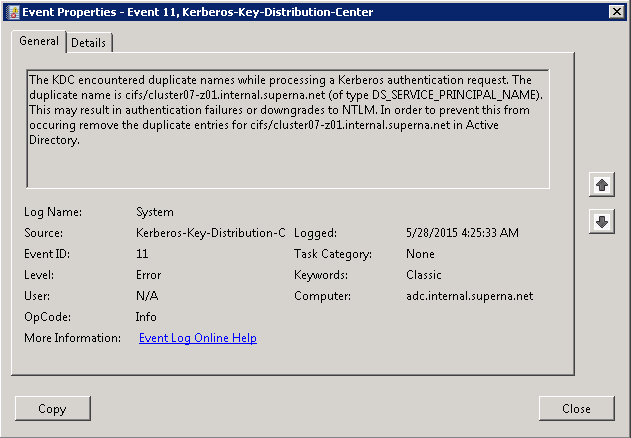
The error seen after duplicate SPNs are created. This error appears on the domain controller when attempting to authenticate a mount request. Note that this error occurs only once, not for each failed authentication.