Tenable Security Center Data Attack Surface Integration
Support Statement
This documentation is provided "as is" without support for 3rd party software. The level of support for this integration guide is best effort without any SLA on response time. No 3rd party product support can be provided by Superna directly. 3rd party components require support contracts. See EULA for more details.
Overview
The Tenable integration offers static asset sync for Data Attack Surface tracking within Security Center. This allows reports on the Data Attack Surface asset and using the asset as a target for a more frequent scanning schedule. Vulnerability scan results are fully integrated into the AI prediction model within Superna Data Attack Surface Manager.
Solution Brief
Read the Solution Brief with Tenable Security Center
Video Overview
Integration Architecture
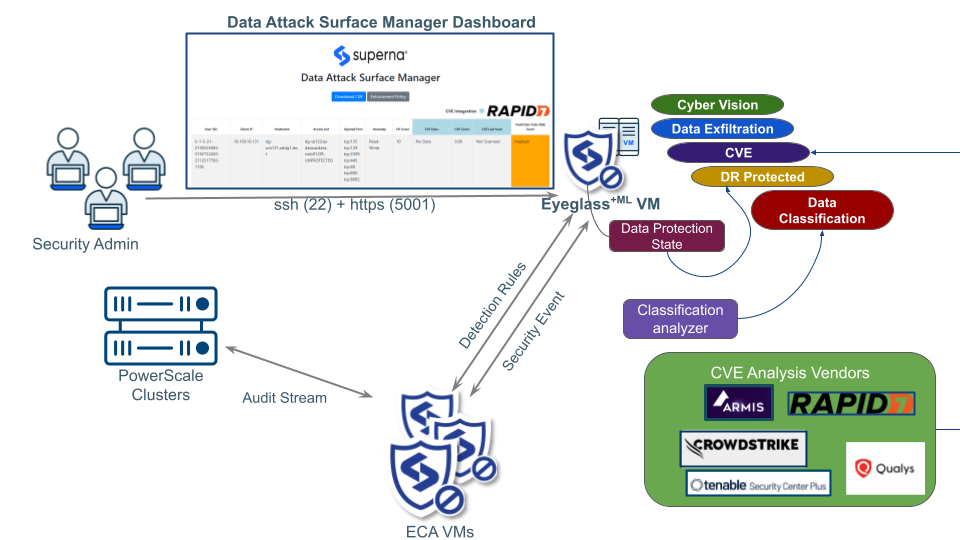
Configuration
-
The integration requires API access to Tenable Security Center. Once the integration is complete, a new Superna Data Attack Surface asset is configured to aggregate data risk score hosts discovered by Superna Data Attack Surface Manager.
-
The configuration files require the following information:
TENABLE_SECURITY_CENTER_URL = 'PLACEHOLDER'  # Replace with Tenable SC URL
TENABLE_ACCESS_KEY = 'PLACEHOLDER'            # Replace with Tenable Access Key
TENABLE_SECRET_KEY = 'PLACEHOLDER'            # Replace with Tenable Secret Key
TENABLE_ASSET_NAME = 'Superna-Data-Attack-Surface'  # Default asset name
TENABLE_OFFSET = '5000' # Default offset -
The scheduled scan data retrieval is automated by DASM to build the AI model training data. The results of the AI model are published into the asset list of static IPs within the asset. The scheduled scan on the asset ensures all Data Attack Surface hosts are scanned for vulnerabilities more frequently.
-
Each new Data Risk Score host is synced to the asset named
Superna-Data-Attack-Surface. This allows filtering reports and dynamic assets with the custom tag.
Administration and Operations
Reporting
- Open the Report interface and create a new report definition.
- Set the filter equal to the asset created by DASM (
Superna-Data-Attack-Surface). - Configure the name of the report.
- Execute the report to see the scope of vulnerabilities on critical data hosts.
A sample report PDF is available for download.
Scanning Data Attack Surface Hosts
- Open the Scans interface.
- Create a new scan definition and set the name.
- Configure the scan settings as required.
- On the Targets tab, set the target to the asset created by DASM (
Superna-Data-Attack-Surface). - Configure any other settings as needed and submit the scan definition.
- Execute the scan.