Qualys VMDR Data Attack Surface Integration
Support Statement
This documentation is provided "as is" without support for 3rd party software. The level of support for this integration guide is best effort without any SLA on response time. No 3rd party product support can be provided by Superna directly. 3rd party components require support contracts. See EULA for more details.
Overview
The Qualys VMDR integration enables tagging of assets with Data Attack Surface information. This allows reports on the Data Attack Surface assets and a more frequent scanning schedule based on dynamic data risk tags. Vulnerability scan results are fully integrated into the AI prediction model within Superna Data Attack Surface Manager (DASM) by mapping asset scan reports with data hosts.
Solution Briefs
Video Overview
Key Features
- Dynamic asset group creation — groups Data Attack Surface hosts to enable scanning and reporting
- Automated scheduled scans — the asset group scheduled scan is created automatically to scan any detected Data Attack Surface hosts
- Scan report ingestion — scan reports are looked up and ingested for AI predictions and key input to host/user data risk scoring
- Dynamic host scans — if a Data Attack Surface host does not have a scan report, automation adds the host to the subscription and requests a scan; a webhook alert is sent when any host in the attack surface does not have a scan within the last 7 days; once all hosts comply with the scanning policy, another webhook alert confirms all hosts have a current scan report
Integration Architecture
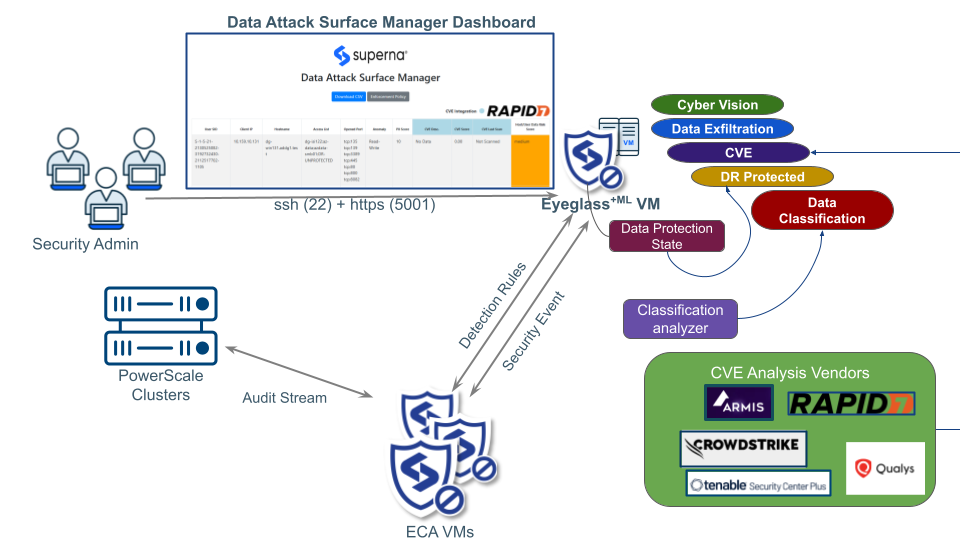
Configuration
-
The integration requires API access to Qualys VMDR. This is requested for a user ID in your tenant account. The username and password authenticate API requests. Contact Qualys support to upgrade an account to support the automation API.
Required permissions:
- Create asset groups and schedules
- Apply tags to assets
- Query scan reports and assets
- Launch scans
-
Log in to the DASM host as
dasmadmin. -
Edit the following file:
/mnt/ml_data/ml-cvm/cvm_qualys_get_extract_cve.pyUpdate the configuration section with your environment values:
schedule_title = "DASM Schedule Scan"
qualys_group_name = "DASM_Asset_Group"
qualys_option_title = "PLACEHOLDER"
qualys_appliance_name = "PLACEHOLDER"
scheduled_time = "01:15"
qualys_time_zone_code = "PLACEHOLDER"
qualys_observe_dst = "yes"
occurrence = "daily"
frequency_days = "1"
Replace each
PLACEHOLDERvalue with the appropriate values from your Qualys environment. -
The scheduled scan data retrieval is automated by DASM to build the AI model training data. The results of the AI model are published into the asset group with a tag applied. The scheduled scan on the asset group ensures all Data Attack Surface hosts are scanned for vulnerabilities more frequently using the DASM Asset Group Scheduled Scan — daily by default.
-
Each new Data Risk Score host is synced to the asset group named
Superna-Data-Attack-Surface. This allows filtering reports and dynamic assets with the custom tag.
Administration and Operations
Tracking Data Attack Surface Hosts
The DASM Asset group stores all flagged Data Attack Surface hosts. This asset group is maintained automatically by DASM, adding and removing assets as risk assessments are updated.
Data Attack Surface Scheduled Scans
The asset group is used to schedule daily scans and increase the frequency of scanning for high-risk hosts. The schedule is automatically created by the integration and defaults to daily scans of all assets in the group. You can customize it as needed.
Reporting
Once Data Attack Surface data is synced into Qualys VMDR, vulnerability reports can use the asset group filter to focus remediation efforts on high-risk hosts.
In the Reports interface, specify the DASM asset group to report on. A sample vulnerability report is available for download.
Scanning Data Attack Surface Hosts
- Open the Scans interface.
- Create a new scan definition and set the target to the DASM asset group.
- Run the scan to scan all DASM-identified hosts, or select individual hosts with the DASM tag on the asset.
Run Risk Analysis for Specific Vulnerabilities on Data Attack Surface Hosts
- Open the Reports tab and select Risk Analysis.
- Select the DASM asset group as the target.
- Specify the IP range and the vulnerability QID.
- Run the report to view targeted vulnerability risk analysis for high-priority data hosts.