Armis Centrix Integration
Support Statement
This documentation is provided "as is" without support for 3rd party software. The level of support for this integration guide is best effort without any SLA on response time. No 3rd party product support can be provided by Superna directly. 3rd party components require support contracts. See EULA for more details.
Overview
The Armis Centrix integration publishes Data Attack Surface high-risk hosts identified by DASM to Centrix with a custom cyberstorage attribute. The attribute applies a numeric weight from 1 to 100 to indicate the data risk level of a host based on the Superna AI data risk model.
Solution Brief
Contact Superna for the full solution brief for this integration.
Video Overview
Integration Architecture
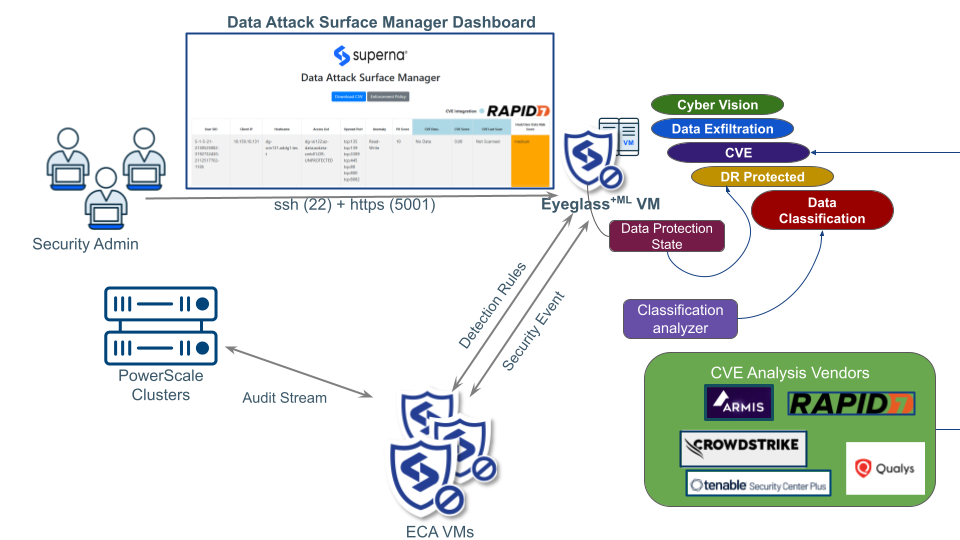
Configure DASM
-
The integration requires API access to Centrix. Once the integration is complete, a new Superna Data Attack Surface site is configured to sync data risk scores to hosts within Centrix.
-
Update the configuration files with the following credentials to authenticate to Centrix:
ARMIS_API_BASE_URL = 'PLACEHOLDER'  # Replace with Armis API Base URL
ARMIS_SECRET_KEY = 'PLACEHOLDER'    # Replace with Armis API Secret Key
- Each new Data Risk Score host is synced to the asset with the custom property set and Data Risk Score applied.
Configure Centrix
Follow the steps below to customize your Centrix portal with a custom asset property and custom risk policy. The custom risk factor policy scans assets with the cyberstorage property score and applies the risk increase.
-
Create a custom device property to import the Data Risk Score computed by DASM.
-
Use this property to set the risk score, where 100 = highest risk and 1 = lowest risk. Map these values to a risk score with a custom risk factor policy.
-
Create a custom risk factor policy named:
Superna_CyberStorage_Data_Attack_Surface_Risk_Factor -
Set the policy condition to:
customProperties:(cyberstorage>80)This flags devices with a CyberStorage Data Attack Surface score above 80 as elevated risk.
Administration and Operations
Once the integration is in place and the Superna AI model has generated the Data Attack Surface and synced assets into Centrix, you can run queries to locate hosts that are part of the Data Attack Surface.
Query Data Attack Surface Devices
Use the following ASQ query to locate assets flagged as Data Attack Surface hosts:
in:riskFactors timeFrame:"7 Days" type:(CyberStorage)
Clicking on Devices lists devices within your Data Attack Surface that have had their risk score increased due to data breach risks. The Inventory Custom Properties menu displays the Data Risk Score value for each device.
View the Custom Risk Factor Policy
Navigate to the risk factor policies section in Centrix to view the custom policy affecting asset risk scores. The Superna_CyberStorage_Data_Attack_Surface_Risk_Factor policy shows the risk factor score applied to each asset — for example, a Data Risk Factor score of 10.