Response Procedures
This section covers the procedures for responding to detected threats, including investigation workflows and available actions.
Open vs Closed Threats
Open Threats are newly detected security events that require investigation and action. Taking any action on an open threat moves it to the Closed Threats tab, where you can view the threat log, handling details, and comments. Actions can no longer be taken on closed threats.
Take Action
How to Take Action on a Threat
-
Locate the Action Button
Find the "Take an Action" button in either the threat details panel or investigation page.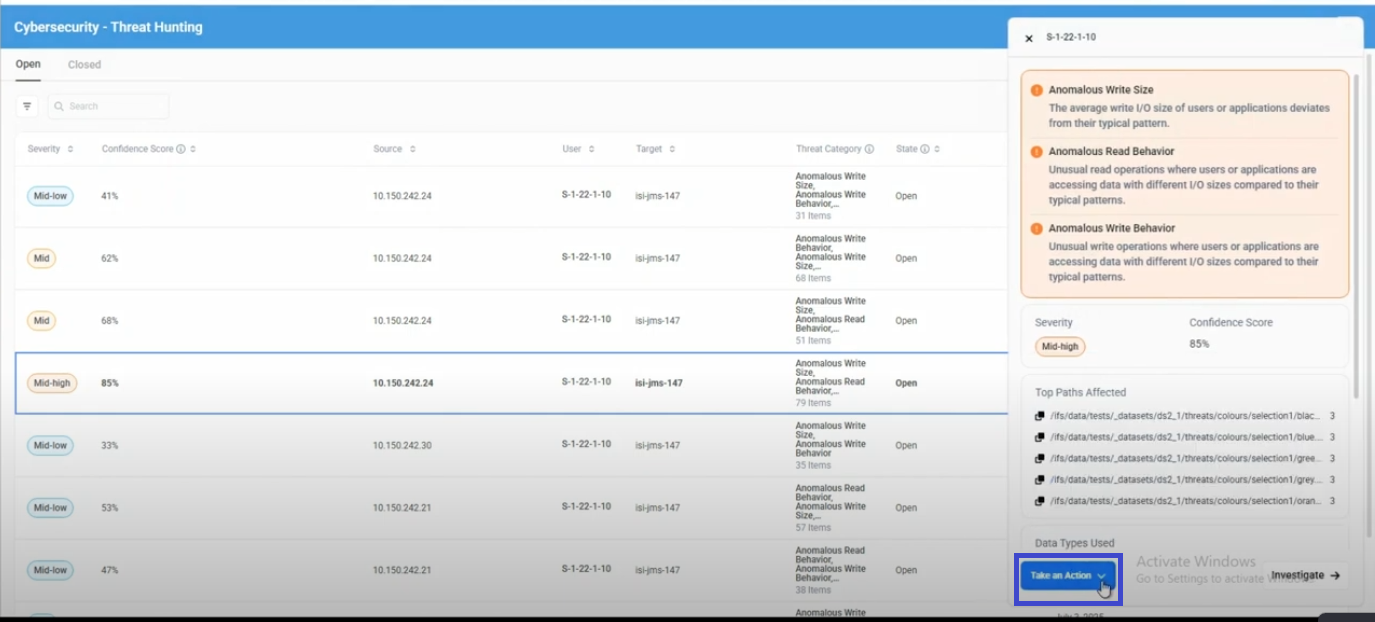
-
Click Take an Action
Click the button to open the action selection dialog. -
Choose Your Response
Select one of two closure options based on your analysis:- Close as Expected Behavior - If this is normal activity for your environment
- Close as Anomaly Confirmed - If this is genuinely suspicious or malicious activity
-
Add Comments (Optional)
Provide additional context or notes about your decision for audit purposes. -
Confirm Your Selection
Click the confirmation button to close the threat. -
Threat Moves to Closed Tab
After confirming your selection, the threat automatically moves to the Closed Threats tab where you can view the threat log, handling details, and comments. If you chose Close as Expected Behavior, the model learns from the event at the next scheduled training.
The "Take an Action" button is available in two locations for open threats:
- Threat Details Panel: When you click on a threat from the main threat list
- Investigation Page: When you're conducting detailed analysis of a threat
Close as Expected Behavior
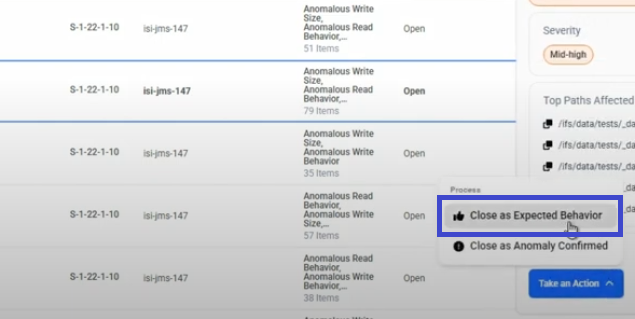
Use this option when the detected activity is normal business operation that should NOT trigger future alerts.
This indicates the detected anomaly is actually normal behavior for this user or application.
The event is included in the next scheduled training, so the model learns that this behavior is normal for this user or application. This reduces false positives for similar activity and helps the system provide more accurate confidence scores.
Closing an event as Expected Behavior changes its state immediately, but the model changes only when the next training run completes. If the same activity occurs before then, it is detected again.
- Developer performing bulk file operations during deployment
- Automated backup systems creating large numbers of files
- Database administrators running maintenance scripts
Close as Anomaly Confirmed
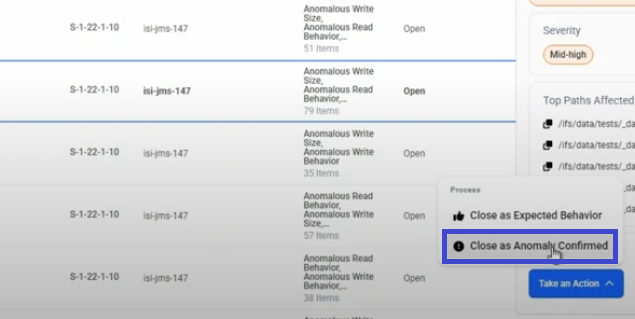
Use this option when you've verified the activity is genuinely suspicious or represents a security concern.
This confirms the anomaly as genuinely suspicious or malicious activity.
Since the AI performed correctly, it does NOT retrain the system. Instead, it confirms the threat detection was accurate and creates a record of an actual security incident for your audit trail. This creates detailed records for compliance and investigation purposes while maintaining the system's sensitivity for detecting similar attack patterns in the future. Your selection validates the system's confidence score accuracy for this type of threat. The event is excluded from model training permanently.
- Unauthorized access attempts to sensitive files
- Data exfiltration patterns (unusual large downloads)
- Ransomware-like behavior (mass file encryption/modification)
Automatic Labeling
The confidence score determines what happens to an open threat that no one acts on:
| Confidence score | What happens |
|---|---|
| Below 75% | Labeled as Expected Behavior automatically after 7 days, and included in the next retraining. |
| 75% or higher | Not labeled automatically. The threat stays open until an administrator closes it. |
Auto-labeling currently cannot be turned off.
The next training run includes or excludes detections as follows:
| Detection state | Confidence score | Included in the next training? |
|---|---|---|
| Open | Below 75% | Yes. Absorbed automatically. |
| Open | 75% or higher | No. Stays anomalous until reviewed. |
| Closed as Anomaly Confirmed | Any | No. Excluded permanently. |
| Closed as Expected Behavior | Any | Yes. Explicit feedback. |
Review the Open Threats tab regularly. A steady stream of low-confidence open threats left untouched can shift the baseline.
See Also
- Threat Detections — Features - How to view and examine threat details
- Detection Types - Complete list of threat detection types and descriptions
- Threat Hunting Configuration - How to configure threat hunting settings