Vault Agent Scheduler for AirGap for Dell
Introduction
The Vault Agent Scheduler provides an additional layer of security for AirGap job scheduling by moving control from Eyeglass into the secure Vault Agent. When this mode is enabled, job schedules can no longer be viewed or modified from Eyeglass. This reduces the risk of accidental or unauthorized changes that could impact replication operations.
Administrators can choose between Vault Control mode (schedules managed entirely within the Vault Agent) and the default Eyeglass Control mode. This setting applies cluster-wide across all Vault Agents and must be consistent to ensure correct operation.
This guide explains how to enable Vault Control mode, how to manage schedules securely from the Vault Agent, and what changes to expect in system behavior and UI access. It includes step-by-step configuration instructions, command references, and details about schedule synchronization, maintenance window limitations, and further UI visibility controls.
Requirements
- Version 2.11.0 or Later
- All Vault Agents in the cluster must use the same scheduling mode (Vault Control mode or Eyeglass Control mode)
- Confirm SSH access to both the Vault Agent(s) and Eyeglass
Configuration Steps
Follow these steps to enable Vault Control mode. The scheduling mode must be consistent across all Vault Agents connected to Eyeglass.
-
Check the current scheduling mode
On all Vault Agents and on Eyeglass, run the appropriate command to view whether scheduling is being handled by Eyeglass or by the Vault Agent.
# Vault Agent
ecactl airgap invaultschedule

# Eyeglass
igls airgap invaultschedule
If the command returns
true, scheduling is managed in the vault.
If the command returnsfalse, scheduling is managed in Eyeglass (default).The default value is false.
-
Set Vault Control mode
On all Vault Agent nodes and on Eyeglass, run the appropriate command to enable Vault Control mode by setting the flag value to true. The default value is false.
# Vault Agent
ecactl airgap invaultschedule --set true

# Eyeglass
igls airgap invaultschedule set --value=true
Eyeglass updates the flag after the next vault heartbeat; allow up to one minute for the change to appear in the UI.
importantYou must set the flag on every Vault Agent and on Eyeglass.
If the flags do not match, schedule‑related operations fail:
- Vault Agent cannot retrieve jobs.
- Eyeglass logs an error or shows inconsistent status.
Eyeglass triggers an alarm, which states
Vault-Controlled Scheduling settings is not sychronized with vault agent. -
Verify scheduling mode
Run the commands from step 1 again. Both Vault Agent and Eyeglass should report
true, confirming that scheduling is being managed from the vault.If you want to keep Eyeglass‑controlled scheduling, leave the flag set to
falseon every Vault Agent and on Eyeglass.
Vault Control Operations
When Vault Control mode is enabled, you manage all schedules and several operations exclusively on the Vault Agent.
List jobs and schedules from the Vault Agent
Use the following command to list jobs and schedule details from the Vault Agent.
ecactl airgap listJobs --source=local
Use --source=eyeglass to compare against the list stored in Eyeglass.
Synchronize job names from Eyeglass
The following command retrieves the jobs and their cron from Eyeglass and updates them in Zookeeper.
ecactl airgap syncjobs
In Vault‑controlled mode, this command updates job names only; cron strings from Eyeglass are ignored.
Set or update a schedule from the Vault Agent
ecactl airgap setschedule --job <jobName> --cron "0 0 * * *"
This command is available only when invaultschedule=true.
The Vault Agent pushes schedules automatically every two hours when Vault‑controlled scheduling is enable. See the note about Schedule Synchronization Timing.
To see updates in the schedule sooner, push the changes manually using the following procedure.
Push schedules to Eyeglass manually from the Vault Agent
Use the following command to push schedule changes manually to the Eyeglass appliance.
ecactl airgap pushschedules
This command only works when invaultschedule=true
Maintenance window requests are blocked when in Vault Control mode.
Display Job History from the Vault Agent
You can view the recent run history for a specific job using the following command:
ecactl airgap history --job <jobName>
Optional flags:
--count <number>: Specifies the number of runs to display.--details <true|false>: Controls whether job step details are included in the output.
Example:
ecactl airgap history --job myReplicationJob --count 10 --details true
Use this command to verify past job executions and troubleshoot scheduling behavior.
Example output:

Additional Information
Changes in Vault‑Controlled Scheduling
When you switch from Eyeglass‑controlled to Vault‑controlled scheduling, the following behavior changes apply:
| Capability | Eyeglass‑Controlled Scheduling | Vault‑Controlled Scheduling |
|---|---|---|
| Schedule visibility and editing in UI | Schedule fields visible; admins can edit jobs from Eyeglass. | Schedule section hidden and read‑only; editing disabled. |
| Manual schedule commands | igls airgap schedule … (UI and CLI). | ecactl airgap setschedule, pushschedules on Vault Agent. |
| Maintenance window command | igls airgap vaultaccessrequest opens the vault. | Command is blocked; use ecactl airgap openvault --interval <interval_in_minutes>. |
| Job history | View in UI and CLI. | View in UI and CLI (no change). |
| Manual job start | From Vault CLI only | From Vault CLI only (startjob / runjob). |
| AirGap UI visibility toggle | Admin can hide all AirGap panes with igls airgap enabledui set --value=false. | Admin can hide all AirGap panes with igls airgap enabledui set --value=false. |
These changes ensure that scheduling is fully isolated in the vault while day‑to‑day monitoring remains available in Eyeglass.
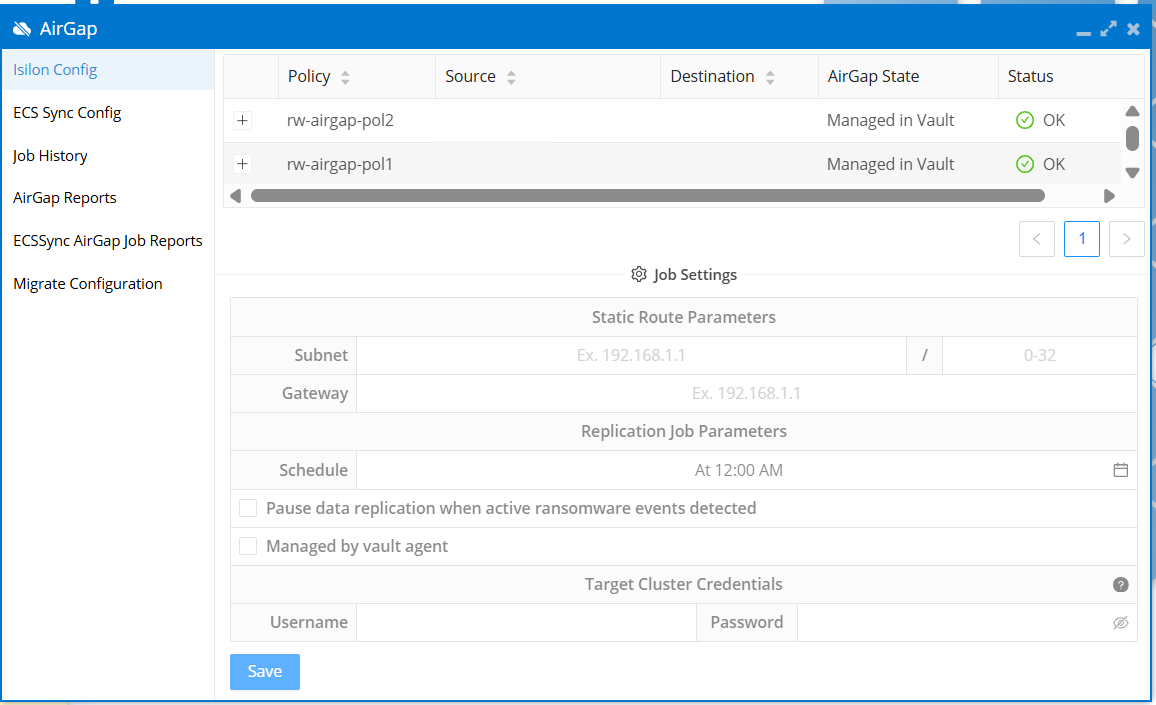
When Eyeglass and the Vault Agent have matching flags, and Vault Control mode is enabled, Eyeglass hides details about Vault-controlled jobs. Here is an example of a Vault-controlled job selected in a correctly configured environment for Vault Control.

Schedule Synchronization Timing
Vault Agent runs a background synchronization job every 2 hours. This task behaves differently depending on the scheduling mode:
-
Eyeglass Control mode (
invaultschedule=false)
The Vault Agent retrieves job names and schedules from Eyeglass and saves them locally. -
Vault Control mode (
invaultschedule=true)
The Vault Agent retrieves only job names from Eyeglass. It does not retrieve schedules. Instead, it pushes its local job schedules to Eyeglass.
Vault Agent retrieves AirGap schedules and jobs every 2 hours by default.
You can change the default 2-hour interval by setting the TASKMASTER_AIRGAP_SCHEDULING_CRON value in /opt/superna/eca/eca-env-common.conf.
This same cron schedule also controls:
- Push of Vault Isilon alerts to Eyeglass
- Checking for maintenance window requests from Eyeglass
Maintenance window checks do not occur in Vault control mode.
Changing the cron schedule for AirGap also changes the timing of these related operations.
To manually push schedules without waiting for the sync job, see the instructions in Push schedules manually from the Vault Agent.
Maintenance Window Behavior
When Vault Control mode is enabled, the following Eyeglass command is blocked and will return an error:
igls airgap vaultaccessrequest --interval=5 --vault=cpvault1
This restriction is in place to prevent scheduling changes from outside the vault.
To open a maintenance window when using Vault Control mode, use the following command from the Vault Agent:
ecactl airgap openvault --interval <minutes>
UI Visibility Control
Eyeglass includes a setting to enable or disable the AirGap user interface. By default, UI access to AirGap features is enabled.
To check the current setting:
igls airgap enabledui
To change the setting:
igls airgap enabledui set --value=true|false
-
When set to false, all AirGap-related UI components are hidden, including access to the Vault Agent window.

-
When set to true, AirGap management features remain visible in the Eyeglass UI.
To apply changes in the Eyeglass UI, refresh the web page.
This setting allows administrators to further restrict visibility into AirGap operations as needed.