Crowdstrike Falcon Endpoint Security (EDR)
Support Statement
This documentation is provided "as is" without support for 3rd party software. The level of support for this integration guide is best effort without any SLA on response time. No 3rd party product support can be provided by Superna directly. 3rd party components require support contracts. See EULA for more details.
Overview
Superna Data Security Edition integrates with CrowdStrike Falcon Endpoint Security to deliver automated, coordinated response across the storage and endpoint layers. When Superna detects malicious activity at the data layer it automatically triggers CrowdStrike Falcon to contain the offending host before the attack can spread.
For ransomware detection, all required indicators are preconfigured by Superna and do not need to be recreated in the EDR. Each payload contains the necessary details for the SecOps team to assess the event, conduct investigations, and trigger automated containment via CrowdStrike Falcon APIs.
See the CrowdStrike integration landing page.
Demo Video
Features and Solution Overview
This integration provides the following capabilities:
- Automated host containment — Superna's storage-layer detection triggers CrowdStrike Falcon to network-isolate the compromised host without manual intervention.
- Lower MTTR and reduced blast radius — compromised hosts are cut off fast, limiting lateral movement and data loss.
- Prevents additional host infection reducing the impact of the cyber incident.
- Rich incident context — each webhook payload includes the actor username, client IP addresses, affected SMB shares, file paths, severity, and detection state so the SOC can immediately assess scope.
- Works with your SOC toolchain — built on Superna's Zero Trust API and webhooks; compatible with Fusion SOAR for further orchestration.
Customer Workflow Benefits
- Correlate Superna's storage-layer detections with other security systems
- Reduce mean time to remediate (MTTR) through automated incident creation
Limitations
- Requires CrowdStrike Falcon Prevent or Falcon Insight (EDR/NGAV) subscription with API access enabled.
- The integration runs as a service on the Superna (Eyeglass) VM and requires direct outbound HTTPS connectivity from the VM to CrowdStrike API endpoints. HTTP/HTTPS proxy routing is not supported.
- Host containment matches on client IP address from the Superna event payload; accuracy depends on correct IP-to-host mapping in Falcon.
- Upgrade and rollback functionality is not available.
About CrowdStrike Falcon
CrowdStrike Falcon is a cloud-native endpoint protection platform (EPP) that combines next-generation antivirus (NGAV), endpoint detection and response (EDR), threat intelligence, and managed hunting. Falcon uses a lightweight agent and AI-powered detection to stop breaches on Windows, macOS, and Linux hosts, with unified visibility and response managed from the Falcon console.
Prerequisites
Before beginning, ensure the following requirements are met:
Superna Requirements
- Superna Data Security Edition - version 2.13.0 or later is recommended for built-in webhook test button
- Active Superna license with Zero Trust / Data Security features enabled.
- Superna (Eyeglass) VM running Linux with systemd
- Minimum 1 GB free disk space on the Eyeglass VM.
- Root (sudo) access to the Eyeglass VM.
CrowdStrike Requirements
- CrowdStrike Falcon Prevent or Falcon Insight subscription.
- API Client credentials (Client ID and Client Secret) with the following scopes:
- Hosts: Read and Write (required for host containment and release)
- Detections: Read (optional, for enrichment)
- Know your CrowdStrike API Base URL (e.g., https://api.us-2.crowdstrike.com or https://api.eu-1.crowdstrike.com).
Network Connectivity
- The Superna VM must have outbound HTTPS (port 443) access to your CrowdStrike API endpoint (api.crowdstrike.com or regional equivalent).
- No inbound firewall rules are required for this integration.
- HTTP/HTTPS proxy routing is NOT supported. Direct connectivity is required.
Installation
Download the Installer
-
Download the Feature Pack installer file
crowdstrike-endpoint-v1.x.x.runfrom the Superna support portal.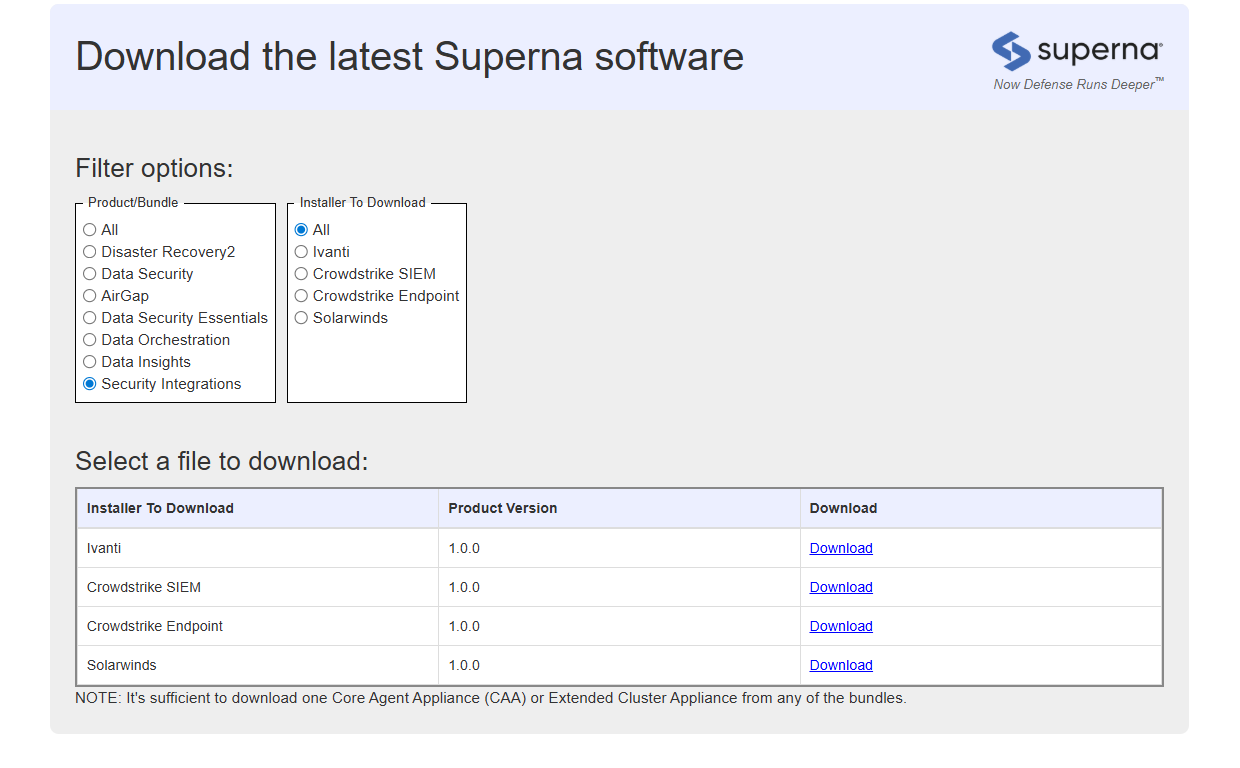
-
Transfer it to the Eyeglass VM using SCP or your preferred secure file transfer method.
scp crowdstrike-endpoint-v1.0.0.run user@your-eyeglass-vm:/tmp/
Turn the Installer Executable
SSH into the Eyeglass VM, navigate to the installer location, and set the executable bit:
ssh user@your-eyeglass-vm
cd /tmp
chmod +x crowdstrike-endpoint-v1.0.0.run
Run the Installer
The installer provides an interactive Text User Interface (TUI). Root (sudo) is required.
sudo ./crowdstrike-endpoint-v1.0.0.run
TUI Keyboard Navigation
| Key | Action |
|---|---|
| Tab | Navigate between fields |
| Enter | Edit field / Confirm selection |
| Esc | Exit field (enables keyboard shortcuts) |
| V | Validate all fields |
| I | Install (press Esc first to exit any active field) |
| Q | Quit installer |
| H | Show help |
Installation Workflow
- Fill in the required configuration fields (see table below).
- Press Esc to exit the active field, then press V to validate all fields.
- Review any validation errors and correct them.
- Press Esc, then press I to start the installation. Confirm when prompted.
Required Configuration Fields
| Field | Description | Example |
|---|---|---|
| CrowdStrike API Client ID | API Client ID from Falcon console | abc123xyz... |
| CrowdStrike API Client Secret | API Client Secret (masked in TUI) | (masked) |
| CrowdStrike API Base URL | Regional API endpoint URL | https://api.us-2.crowdstrike.com |
| Eyeglass Host IP Address | IP of the Superna Eyeglass VM | 10.0.0.50 |
| Enable Host Isolation | Enable automatic host containment on detection | true (recommended) |
| Webhook Port | Local port for the webhook listener (auto-assigned if conflict) | 5000 |
| Install Default Webhook | Auto-register webhook in Superna Data Security Edition | true (recommended) |
Note: The installer automatically detects port conflicts and assigns the next available port if the requested webhook port is already in use by another integration.
Preview / Dry Run (Optional)
To preview what the installer will do without making any system changes, run:
sudo ./crowdstrike-endpoint-v1.0.0.run --dry-run
Verify Service Status
After installation completes, confirm the integration service is running:
sudo systemctl status crowdstrike-endpoint.service
Expected output:
crowdstrike-endpoint.service - CrowdStrike Endpoint Integration
Loaded: loaded (/etc/systemd/system/crowdstrike-endpoint.service)
Active: active (running) since ...
Configuration
Configure CrowdStrike Falcon API Credentials
- Log in to the CrowdStrike Falcon console.
- Navigate to Support → API Clients and Keys.
- Click Add new API client.
- Provide a descriptive name (e.g., Superna-Integration).
- Enable the following API scopes: Hosts – Read and Write.
- Record the Client ID and Client Secret. The secret is shown only once.
- Note your regional API base URL (visible on the API Clients page or in Falcon platform settings).
Configure Superna Webhooks
If Install Default Webhook was selected as true during installation, the webhook is already registered automatically. You can review or adjust the configuration at:
Integrations → Webhooks → crowdstrike-endpoint
Recommended webhook filter settings:
- Severities: Critical and Major events only.
- Events / Lifecycle states: LOCKED_OUT and DELAYED_LOCKOUT (events that signal active containment decisions).
- Event types: THREAT_DETECTION.
Note: In Enforcement mode, only Critical and Major events are generated. In Monitor mode, Warning events are generated. Align your webhook filter to your operating mode to avoid alert fatigue.
Test the Integration
For Superna Data Security Edition 2.13 and later:
- Log in to the Superna Data Security Edition web interface.
- Navigate to Integrations → Webhooks.
- Locate the crowdstrike-endpoint webhook entry.
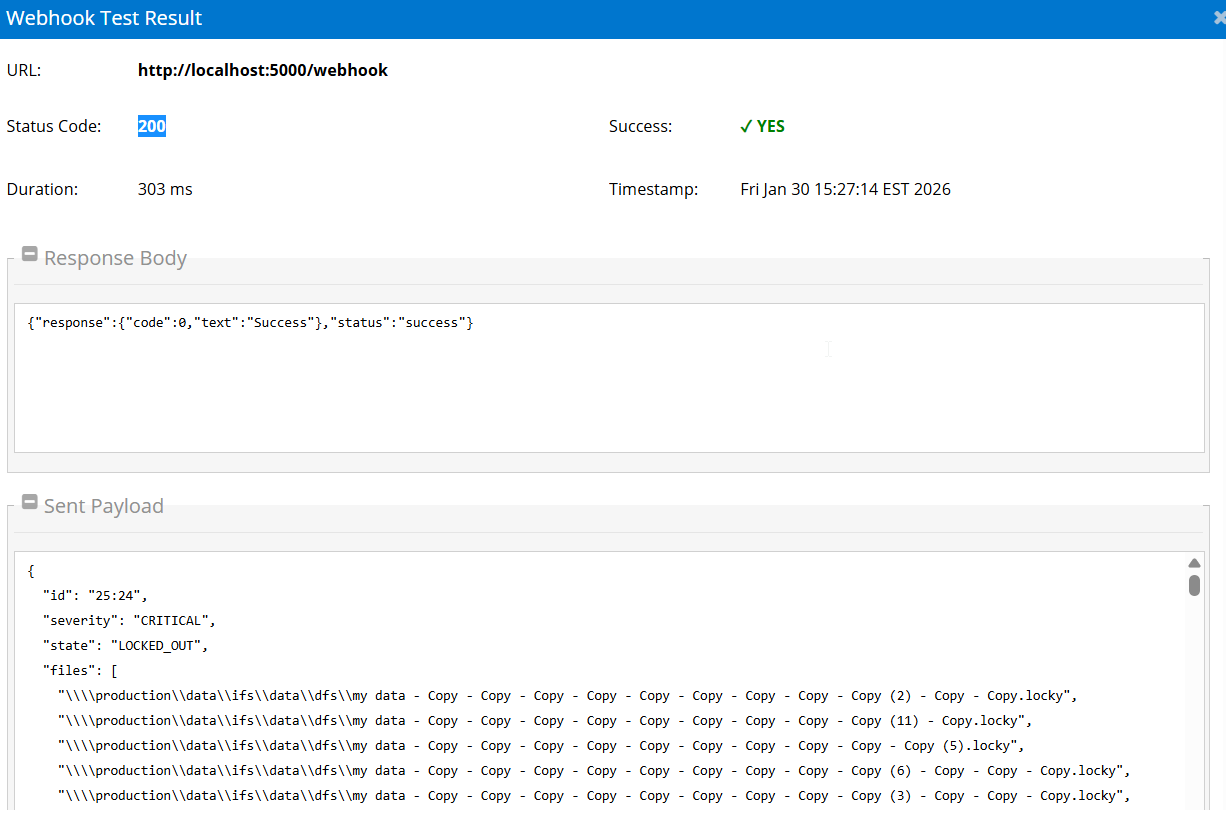
- Click the Test Webhook button.
- Verify HTTP response code 200 or 201 is returned. Any other response indicates a configuration issue.
Send a sample payload manually using a sample curl command.
Modify Configuration After Installation
Run the installer again to make any changes in your configuration.
SecOps Administrator Integration Experience
How the Integration Works End-to-End
Once the integration is fully configured, the automated response flow is as follows:
- Detect — Superna Data Security Edition identifies a critical threat on the storage layer (e.g., ransomware encryption patterns, mass deletion, anomalous SMB activity).
- Trigger — Superna's webhook posts an event payload to the local crowdstrike-endpoint service. The payload includes severity, user, client IP addresses, affected shares, and file paths.
- Contain — The integration service calls the CrowdStrike Falcon API to contain (network-isolate) the matching host, identified by the client IP from the Superna event.
- Confirm — Host containment status is immediately visible in the CrowdStrike Falcon Host Management console. The SOC proceeds with investigation and host remediation.
- Release — Once the host is validated clean, the SOC releases containment from the Falcon console. The Zero Trust lockout in Superna can be cleared through the Superna interface.
What Administrators Will See in CrowdStrike Falcon
- The contained host appears in Falcon Host Management with status Network Contained.
- Host containment events are logged in Falcon's audit trail with the API client name (e.g., Superna-Integration) as the actor.
- Standard Falcon investigation workflows apply: examine process trees, network activity, file writes, and registry changes associated with the affected host.
Recommended Response Workflow
- Receive notification — an alert is generated in your monitoring or SIEM system (Falcon or a third-party SIEM) indicating a Superna detection.
- Review Superna alert — examine the event details in the Superna Data Security Edition interface: which user triggered the alert, what files and shares were affected, and what the current state is (LOCKED_OUT, DELAYED_LOCKOUT).
- Review Falcon telemetry — pivot to the Falcon console to review endpoint behavior on the contained host: process activity, network connections, file events.
- Correlate signals — combine Superna's storage-layer view with all the signals available in your SIEM.
- Investigate and remediate — work with your IR process to clean the host (run Falcon Real Time Response, re-image, restore from snapshot).
- Release and restore — release network containment in Falcon and clear the Zero Trust lockout made by Superna (using Superna's interface or leveraging our API via SOAR) once the host is clean.
Architecture / Flow
Troubleshooting
Useful Commands
Check real-time service logs:
sudo journalctl -u crowdstrike-endpoint.service -f
Start / Stop / Restart:
sudo systemctl start crowdstrike-endpoint.service
sudo systemctl stop crowdstrike-endpoint.service
sudo systemctl restart crowdstrike-endpoint.service
sudo systemctl status crowdstrike-endpoint.service
Enable / Disable Auto-Start on Boot:
sudo systemctl enable crowdstrike-endpoint.service
sudo systemctl disable crowdstrike-endpoint.service
Review Logs:
ls -la /opt/superna/sca/logs/crowdstrike-endpoint-fpk-install-20260115-163142.log
Real-time service logs:
sudo journalctl -u crowdstrike-endpoint.service -f
sudo journalctl -u crowdstrike-endpoint.service -n 100
View last 100 log lines:
sudo journalctl -u crowdstrike-endpoint.service -n 100
View webhook registration:
sudo cat /opt/superna/sca/data/eventWebhook.json | jq .
Test CrowdStrike API connectivity from the VM:
curl -s https://api.crowdstrike.com/oauth2/token \
  -d "client_id=$CROWDSTRIKE_CLIENT_ID&client_secret=$CROWDSTRIKE_CLIENT_SECRET" \
  -H "Content-Type: application/x-www-form-urlencoded"
Common Misconfigurations
| Issue | Likely Cause | Resolution |
|---|---|---|
| Service fails to start | Missing or invalid config.env values | Check config.env; verify Client ID, Secret, and Base URL are correct. Restart service. |
| Webhook returns non-200 response | Service not running or port mismatch | Run: systemctl status crowdstrike-endpoint.service. Check that the webhook URL port matches the assigned WEBHOOK_PORT. |
| Host not contained after detection | Client IP not matching a Falcon-enrolled host | Verify the client IP in the Superna event corresponds to a Falcon-managed host. Check Host Management in Falcon console. |
| API authentication failure (401) | Expired or revoked API credentials | Regenerate API credentials in Falcon console, update config.env, and restart the service. |
| Permission denied on Falcon API (403) | API client missing required scopes | Ensure the API client has Hosts: Read and Write scopes enabled. Update in Falcon API Clients and Keys. |
| Cannot reach CrowdStrike API | Firewall blocking outbound HTTPS from VM | Verify outbound port 443 is open from the Eyeglass VM to api.crowdstrike.com (or your regional endpoint). Proxy is not supported. |
| Port conflict during installation | Requested webhook port already in use | The installer auto-detects and assigns the next available port. Check the installation log and verify WEBHOOK_PORT in config.env. |
Debugging Steps
- Verify the service is running:
systemctl status crowdstrike-endpoint.service. - Check service logs for errors:
journalctl -u crowdstrike-endpoint.service -n 50. - Validate config.env contains correct API credentials and base URL.
- Test CrowdStrike API authentication using the curl command above.
- Send a manual test webhook and check the service log for the response.
- In Falcon, confirm the target host IP is associated with a managed host in Host Management.
- Contact Superna support with service logs if the issue persists.
FAQs
Does this change how AD lockouts work?
No. Falcon containment is in addition to any Superna lockout actions you already use.
Will containment hit performance?
The API calls are lightweight. The only impactful action is Falcon's host containment, which is expected and controlled by your SOC.
Can we pilot in a lab first?
Yes — we recommend starting with a non-prod endpoint to validate end-to-end.
What's required from our side?
CrowdStrike API client credentials with Host/Asset read/write in your Falcon tenant. We'll guide you.
Is host containment automatic?
Yes, if the "Enable Host Isolation" flag is set to true during installation. The integration automatically contains hosts when Superna detects critical threats.
What versions of Superna are supported?
Version 2.13.0 or later is recommended for the built-in webhook test button, but earlier versions are supported with manual webhook testing.
Can I use this integration with a proxy?
No. HTTP/HTTPS proxy routing is not supported. The Superna VM must have direct outbound HTTPS connectivity to CrowdStrike API endpoints.
How accurate is IP-to-host matching?
Host containment accuracy depends on the CrowdStrike Falcon database maintaining correct IP-to-host mappings. Verify in Falcon Host Management that client IPs resolve to the expected devices.
Can I upgrade or rollback the integration?
Upgrade and rollback functionality is not currently available. Contact Superna support for assistance with version changes.
Where can I find installation logs?
Installation logs are stored in /opt/superna/sca/logs/ with filenames like crowdstrike-endpoint-fpk-install-YYYYMMDD-HHMMSS.log.