Examples
Introduction
The Examples section gives usage scenarios for integrating and using the Superna Eyeglass API, including CMDB integration, VMware SRM failover, and Access Zone failover. Each example illustrates how to interact with the API through various operations, such as initiating failover jobs, monitoring their progress, and managing configurations.
Example 1: CMDB Integration API
Eyeglass enables integration with ServiceNow and other CMDB systems that support HTTP GET requests and XML input files. Key data about clusters and configurations are maintained in the CMDB to map services, track service statuses, and manage resources. This integration supports asset management, fault monitoring, and common service availability by linking IT components involved in each service—for example, home directories require PowerScale OneFS storage and Active Directory.
The Eyeglass solution provides asset management and service status integration for shares and exports, supporting the following CI objects:
CI objects:
- Cluster health, name, version, type, revision
- Node disk usage
- Share name, path, access zone, DR status (Active, DR, unprotected)
- Export path, access zone, DR status (Active, DR, unprotected)
- Quota path, type, usage, limits (hard, soft, advisory)
To access the XML file, use the following URL format: https://x.x.x.x/servicenow/servicenow.xml.
The XML file is updated every 5 minutes with the latest information from all managed clusters, including any new configurations detected.
SyncIQ protection of shares and exports in the XML output Description
The XML file includes SyncIQ protection status for shares and exports, marking each with a data protection status.
Eyeglass automatically audits all shares and exports, assigning a protection status attribute in the XML:
- unprotected: No SyncIQ policy is applied.
- active: Writable copy of the data.
- backup: DR copy that is not writable.
Quota output in the XML file Description
Quota details, including type, path, and usage in bytes, are included in the XML file. The usage data updates every 5 minutes, ensuring that the CMDB remains up-to-date with the latest quota information.
Asset Management output in the XML file Description
The cluster node count and serial number in the XML file can be used for asset management updates. This information is dynamically updated: if cluster nodes are added, the file automatically includes the new nodes. Similarly, if the cluster’s software version changes, the XML file will reflect the updated software version.
You can use this information to maintain current and accurate CMDB asset records for PowerScale OneFS clusters.
How to Integrate with a CMDB
The XML file path has been tested with ServiceNow, which supports HTTP GET/XML file features. This capability is also available in most CMDB products. While Eyeglass does not support integration and transformation mapping, Professional Services are available for assistance with CMDB integration.
Typically, integration requires scheduling the retrieval of the XML file and mapping its fields to a CI object in the CMDB.
The following screenshot illustrates how this integration can be set up with ServiceNow.
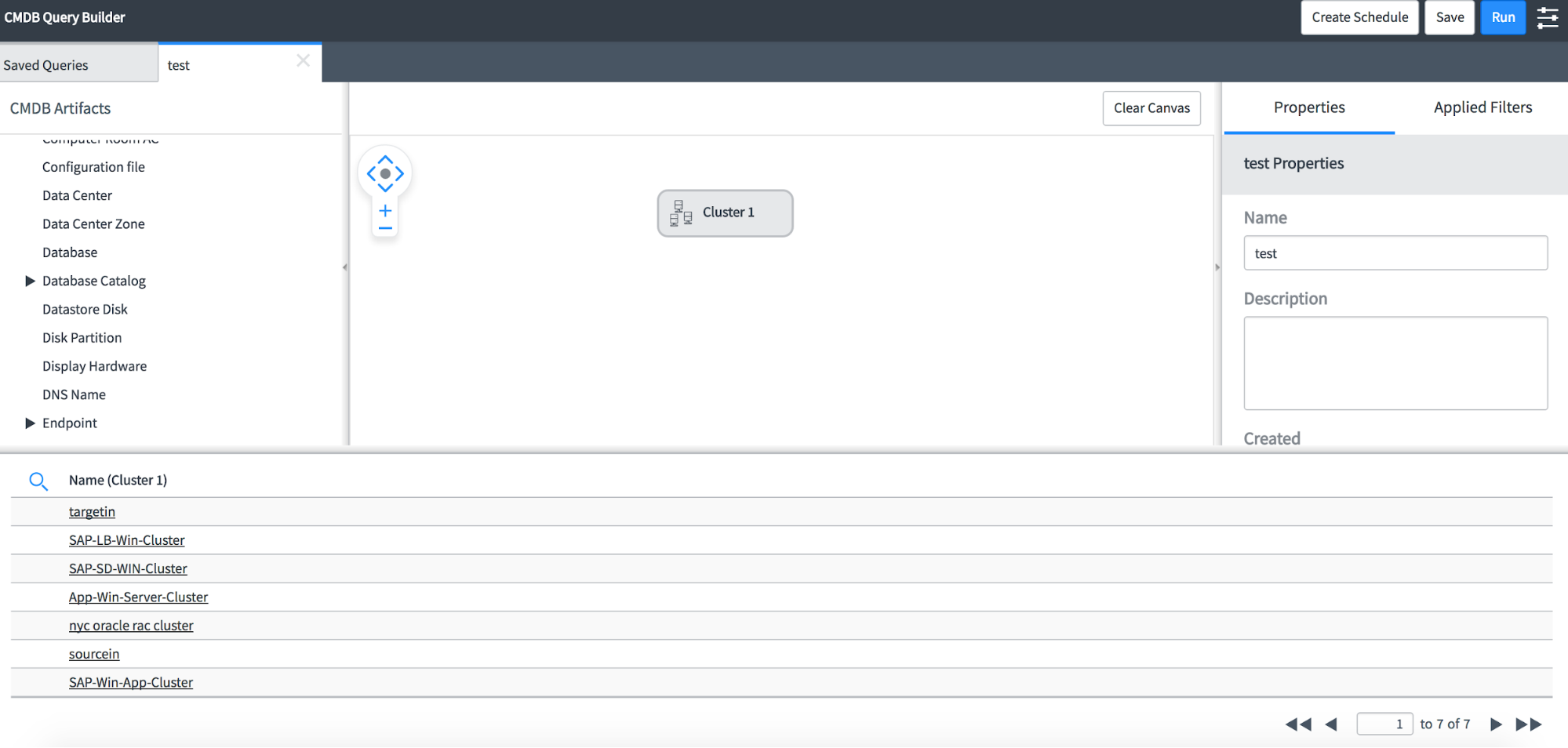
Sample CMDB XML file for 4 clusters
Sample - CMDB XML file
<?xml version="1.0" encoding="UTF-8" standalone="yes"?>
<elements>
<element>
<cluster>
<name>Cluster-1-7201</name>
<guid>005056ba34580f410c55fd077989478a3821</guid>
<local_serial>V5052427352</local_serial>
<onefs_version>
<build>B_7_2_1_014(RELEASE)</build>
<release>v7.2.1.0</release>
<type>PowerScale OneFS</type>
<version>PowerScale OneFS v7.2.1.0 B_7_2_1_014(RELEASE): 0x70201500000000E:Mon Jun 22 20:05:42 GMT 2015 root@sea-build7-03:/b/mnt/obj/b/mnt/src/sys/IQ.amd64.release clang version 3.3 (tags/RELEASE_33/final)</version>
<revision>504967551327928334</revision>
</onefs_version>
</cluster>
<nodes>
<node>
<health>OK</health>
<serial_number>V5052427352</serial_number>
<HDD_size>35GB</HDD_size>
<HDD_used>13GB</HDD_used>
<HDD_avail>23GB</HDD_avail>
<VHS>n/a</VHS>
</node>
</nodes>
<shares>
<share>
<name>SMB2</name>
<path>/ifs/data/policy1</path>
<zone>System</zone>
<status>ACTIVE</status>
</share>
<share>
<name>spacetest</name>
<path>/ifs/data/policy1/space</path>
<zone>System</zone>
<status>ACTIVE</status>
</share>
<share>
<name>igls-dfs-dfs1</name>
<path>/ifs/data/userdata/dfs1</path>
<zone>data</zone>
<status>BACKUP</status>
</share>
<share>
<name>igls-dfs-roam</name>
<path>/ifs/data/userdata/dfs1/roam</path>
<zone>data</zone>
<status>BACKUP</status>
</share>
<share>
<name>share1</name>
<path>/ifs/data/userdata/share1</path>
<zone>data</zone>
<status>ACTIVE</status>
</share>
</shares>
<exports>
<export>
<paths>/ifs</paths>
<zone>System</zone>
<status>UNPROTECTED</status>
</export>
<export>
<paths>/ifs/data/robot</paths>
<zone>EyeglassRunbookRobot-AccessZone</zone>
<status>ACTIVE</status>
</export>
<export>
<paths>/ifs/data/userdata/export1/andrew</paths>
<zone>data</zone>
<status>ACTIVE</status>
</export>
<export>
<paths>/ifs/data/userdata/export1</paths>
<zone>data</zone>
<status>ACTIVE</status>
</export>
</exports>
<aliases/>
<quotas>
<quota>
<path>/ifs/data/userdata</path>
<type>directory</type>
<used>5299221577</used>
<hardLimit>17008070491</hardLimit>
</quota>
<quota>
<path>/ifs/data/userdata/export1/andrew</path>
<type>directory</type>
<used>12</used>
</quota>
<quota>
<path>/ifs/data/policy1</path>
<type>directory</type>
<used>1972155571</used>
<hardLimit>21474836480</hardLimit>
</quota>
<quota>
<path>/ifs/data/policy1/space</path>
<type>directory</type>
<used>851444622</used>
</quota>
<quota>
<path>/ifs/data/userdata/export1</path>
<type>directory</type>
<used>124216376</used>
<advisoryLimit>1048576000</advisoryLimit>
</quota>
<quota>
<path>/ifs/data/userdata/share1</path>
<type>directory</type>
<used>218</used>
</quota>
<quota>
<path>/ifs/data/policy1/departmentB</path>
<type>directory</type>
<used>12</used>
<hardLimit>26843545600</hardLimit>
</quota>
<quota>
<path>/ifs/data/robot</path>
<type>directory</type>
<used>24833</used>
</quota>
<quota>
<path>/ifs/data/policy1/departmentA</path>
<type>directory</type>
<used>12</used>
<hardLimit>26843545600</hardLimit>
</quota>
</quotas>
</element>
<element>
<cluster>
<name>Cluster2-7201</name>
<guid>005056ba72edf6450c552312a728d3a22a23</guid>
<local_serial>V5052443373</local_serial>
<onefs_version>
<build>B_7_2_1_014(RELEASE)</build>
<release>v7.2.1.0</release>
<type>PowerScale OneFS</type>
<version>PowerScale OneFS v7.2.1.0 B_7_2_1_014(RELEASE): 0x70201500000000E:Mon Jun 22 20:05:42 GMT 2015 root@sea-build7-03:/b/mnt/obj/b/mnt/src/sys/IQ.amd64.release clang version 3.3 (tags/RELEASE_33/final)</version>
<revision>504967551327928334</revision>
</onefs_version>
</cluster>
<nodes>
<node>
<health>-A--</health>
<serial_number>V5052443373</serial_number>
<HDD_size>35GB</HDD_size>
<HDD_used>11GB</HDD_used>
<HDD_avail>25GB</HDD_avail>
<VHS>n/a</VHS>
</node>
</nodes>
<shares>
<share>
<name>igls-dfs-SMB2</name>
<path>/ifs/data/policy1</path>
<zone>System</zone>
<status>BACKUP</status>
</share>
<share>
<name>igls-dfs-spacetest</name>
<path>/ifs/data/policy1/space</path>
<zone>System</zone>
<status>BACKUP</status>
</share>
<share>
<name>migrate1</name>
<path>/ifs/data/migrate1</path>
<zone>System</zone>
<status>UNPROTECTED</status>
</share>
<share>
<name>dfs1</name>
<path>/ifs/data/userdata/dfs1</path>
<zone>data</zone>
<status>ACTIVE</status>
</share>
<share>
<name>roam</name>
<path>/ifs/data/userdata/dfs1/roam</path>
<zone>data</zone>
<status>ACTIVE</status>
</share>
<share>
<name>share1</name>
<path>/ifs/data/userdata/share1</path>
<zone>data</zone>
<status>BACKUP</status>
</share>
<share>
<name>share2</name>
<path>/ifs/data/userdata/share2</path>
<zone>data</zone>
<status>ACTIVE</status>
</share>
<share>
<name>dfs1</name>
<path>/ifs/data/dr-testing/dfs1</path>
<zone>DR-Testing-Zone</zone>
<status>BACKUP</status>
</share>
<share>
<name>share1</name>
<path>/ifs/data/dr-testing/share1</path>
<zone>DR-Testing-Zone</zone>
<status>BACKUP</status>
</share>
<share>
<name>share2</name>
<path>/ifs/data/dr-testing/share2</path>
<zone>DR-Testing-Zone</zone>
<status>BACKUP</status>
</share>
</shares>
<exports>
<export>
<paths>/ifs</paths>
<zone>System</zone>
<status>UNPROTECTED</status>
</export>
<export>
<paths>/ifs/data/migrate1</paths>
<zone>System</zone>
<status>UNPROTECTED</status>
</export>
<export>
<paths>/ifs/data/robot</paths>
<zone>EyeglassRunbookRobot-AccessZone</zone>
<status>BACKUP</status>
</export>
<export>
<paths>/ifs/data/userdata/export1/andrew</paths>
<zone>data</zone>
<status>BACKUP</status>
</export>
<export>
<paths>/ifs/data/userdata/export1</paths>
<zone>data</zone>
<status>BACKUP</status>
</export>
<export>
<paths>/ifs/data/dr-testing/export1/andrew</paths>
<zone>DR-Testing-Zone</zone>
<status>BACKUP</status>
</export>
<export>
<paths>/ifs/data/dr-testing/export1</paths>
<zone>DR-Testing-Zone</zone>
<status>BACKUP</status>
</export>
</exports>
<aliases/>
<quotas>
<quota>
<path>/ifs/data/userdata/dfs1</path>
<type>directory</type>
<used>5175108664</used>
</quota>
<quota>
<path>/ifs/data/userdata/dfs1/roam</path>
<type>directory</type>
<used>2251508</used>
</quota>
<quota>
<path>/ifs/data/migrate1</path>
<type>directory</type>
<used>769442173</used>
</quota>
<quota>
<path>/ifs/data/userdata/share2</path>
<type>directory</type>
<used>12</used>
</quota>
</quotas>
</element>
<element>
<cluster>
<name>prod-8</name>
<guid>005056ba67371492dd56f106ca5e3ff16028</guid>
<local_serial>SV200-004EIJ-B96U</local_serial>
<onefs_version>
<build>B_8_0_1_007(RELEASE)</build>
<release>v8.0.1.0</release>
<type>PowerScale OneFS</type>
<version>PowerScale OneFS v8.0.1.0 B_8_0_1_007(RELEASE): 0x800015000000007:Thu Sep 8 06:34:05 PDT 2016 root@sea-build10-02:/b/mnt/obj/b/mnt/src/sys/IQ.amd64.release FreeBSD clang version 3.3 (tags/RELEASE_33/final 183502) 20130610</version>
<revision>576462195412434951</revision>
</onefs_version>
</cluster>
<nodes>
<node>
<health>OK</health>
<serial_number>SV200-004EIJ-B96U</serial_number>
<HDD_size>18.1GB</HDD_size>
<HDD_used>2.6GB</HDD_used>
<HDD_avail>15.5GB</HDD_avail>
<VHS>n/a</VHS>
</node>
</nodes>
<shares>
<share>
<name>migrate2</name>
<path>/ifs/data/migrate2</path>
<zone>System</zone>
<status>UNPROTECTED</status>
</share>
<share>
<name>dfs1</name>
<path>/ifs/data/marketing/dfs1</path>
<zone>marketing</zone>
<status>ACTIVE</status>
</share>
<share>
<name>share1</name>
<path>/ifs/data/marketing/shares</path>
<zone>marketing</zone>
<status>ACTIVE</status>
</share>
</shares>
<exports>
<export>
<paths>/ifs</paths>
<zone>System</zone>
<status>UNPROTECTED</status>
</export>
<export>
<paths>/ifs/data/migrate2</paths>
<zone>System</zone>
<status>UNPROTECTED</status>
</export>
<export>
<paths>/ifs/data/marketing/nfs/export1</paths>
<zone>marketing</zone>
<status>ACTIVE</status>
</export>
</exports>
<aliases/>
<quotas>
<quota>
<path>/ifs/data/marketing/nfs/export1</path>
<type>directory</type>
<used>0</used>
</quota>
<quota>
<path>/ifs/data/marketing/shares</path>
<type>directory</type>
<used>12</used>
</quota>
<quota>
<path>/ifs/data/marketing/dfs1</path>
<type>directory</type>
<used>58599</used>
</quota>
<quota>
<path>/ifs/data/migrate2</path>
<type>directory</type>
<used>769417411</used>
</quota>
</quotas>
</element>
<element>
<cluster>
<name>dr-8</name>
<guid>005056ba657091badd564b1487f19066d641</guid>
<local_serial>SV200-004EIJ-AQR3</local_serial>
<onefs_version>
<build>B_8_0_1_007(RELEASE)</build>
<release>v8.0.1.0</release>
<type>PowerScale OneFS</type>
<version>PowerScale OneFS v8.0.1.0 B_8_0_1_007(RELEASE): 0x800015000000007:Thu Sep 8 06:34:05 PDT 2016 root@sea-build10-02:/b/mnt/obj/b/mnt/src/sys/IQ.amd64.release FreeBSD clang version 3.3 (tags/RELEASE_33/final 183502) 20130610</version>
<revision>576462195412434951</revision>
</onefs_version>
</cluster>
<nodes>
<node>
<health>OK</health>
<serial_number>SV200-004EIJ-AQR3</serial_number>
<HDD_size>18.1GB</HDD_size>
<HDD_used>2.9GB</HDD_used>
<HDD_avail>15.2GB</HDD_avail>
<VHS>n/a</VHS>
</node>
</nodes>
<shares>
<share>
<name>migrate1</name>
<path>/ifs/data/dr/migrate</path>
<zone>System</zone>
<status>UNPROTECTED</status>
</share>
<share>
<name>igls-dfs-dfs1</name>
<path>/ifs/data/marketing/dfs1</path>
<zone>marketing</zone>
<status>BACKUP</status>
</share>
<share>
<name>share1</name>
<path>/ifs/data/marketing/shares</path>
<zone>marketing</zone>
<status>BACKUP</status>
</share>
</shares>
<exports>
<export>
<paths>/ifs</paths>
<zone>System</zone>
<status>UNPROTECTED</status>
</export>
<export>
<paths>/ifs/data/dr/migrate</paths>
<zone>System</zone>
<status>UNPROTECTED</status>
</export>
<export>
<paths>/ifs/data/marketing/nfs/export1</paths>
<zone>marketing</zone>
<status>BACKUP</status>
</export>
</exports>
<aliases/>
<quotas>
<quota>
<path>/ifs/data/dr/migrate</path>
<type>directory</type>
<used>167747631</used>
</quota>
</quotas>
</element>
</elements>
Example 2: VMware SRM Integrated Failover Example
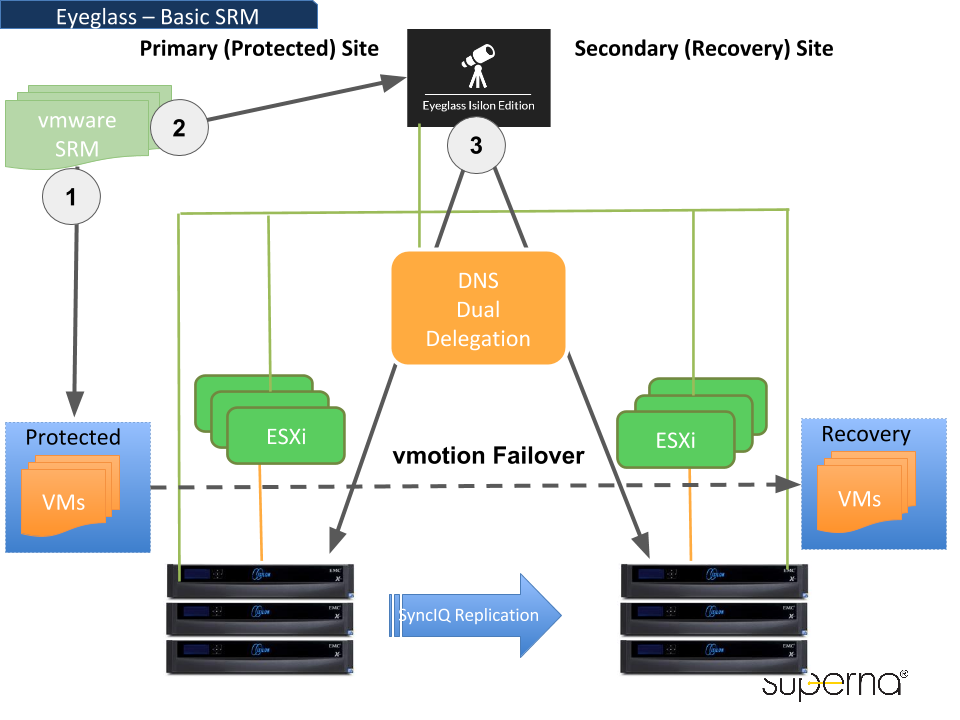
VMware Site Recovery Manager (SRM) can initiate a site failover of virtual machines (VMs) and integrate with the Eyeglass REST API for automated failover of data managed by Superna Eyeglass. Here’s how to configure SRM to work with the Eyeglass API:
-
Add a Custom Command to the Recovery Plan
To integrate with the Eyeglass API, add a command to the SRM recovery plan that calls the Eyeglass REST API viacurl. -
Configure Pre-Power On or Post-Power On Steps In the Recovery Properties tab, add a command under Pre-Power On Steps or Post-Power On Steps. Ensure the SRM server can execute the command, which will call the Eyeglass API to initiate a failover.
-
Set Up the Command in Windows Command Shell To run a script located at
c:\alarmscript.bat, for example, use the following command line:c:\windows\system32\cmd.exe /c c:\alarmscript.bat -
Install Batch Files on the Recovery Site’s SRM Server
Place all necessary batch files and commands on the SRM server at the recovery site. Ensure that batch files or commands containing characters with ASCII values above 127 are UTF-8 encoded. SRM records only the last 4KB of script output in log files, so if the script produces a large output, it should be redirected to a file instead of sending to the standard output. -
Ensure Commands Complete Within the Timeout Limit
By default, SRM terminates any command that runs longer than 600 seconds. You may receive a timeout error if your script exceeds this limit. To adjust the timeout, edit the SRM configuration file (vmware-dr.xml) and modify the<calloutCommandLineTimeout>setting:<calloutCommandLineTimeout>600</calloutCommandLineTimeout> -
Initiate the Eyeglass Failover via CURL Command
The Eyeglass API processes requests from thecurlcommand with the specified timeout. Using the CURL builder, you can configure the command to start any failover mode supported by Eyeglass, based on your recovery requirements.
Example 3: Initiate an Access Zone Failover
To initiate an access zone failover, use the following failover setting parameters available in the Eyeglass REST API.
Failover Setting Parameters
| Parameter | Description |
|---|---|
| controlled | Execute a controlled failover by running operations against the source cluster as well as the target |
| datasync | Run the final incremental data sync before failover |
| configsync | Run a configuration sync before failover. Should be set to false for Release 2.5.6 and above. |
| resyncprep | Run resync prep on the source cluster to create the mirror policies |
| disablemirror | Disable mirror policies created on the failover target |
| quotasync | Run quota jobs to failover quotas to the target |
| blockonwarnings | Blocks failover from starting if DR failover status is Warning when set to true. All warnings in DR Readiness will block failover. Best Practice: Verify with support before disabling this option. |
| rollbackrenameshares | Applicable only to DFS mode failover; should remain enabled to automatically rollback SMB share rename step if required due to an error in the failover step. |
| smbdataintegrity | Disconnects any active SMB sessions prior to failover and ensures no new sessions can be established on the failover source. Applies a deny-read permission to the Everyone user for each share. Note: Shares with "run as root" cannot be locked out from access. |
Failover Parameters Rules
In the Eyeglass REST API, failover jobs can only be initiated when the Readiness status is OK, INFO, or WARNING. If the Readiness status is ERROR, the failover job will be blocked, and the following error message will be returned:
{
  "code": 500,
  "message": "{\"code\":500,\"message\":\"Zone zone01 is not eligible for failover\"}"
}
Before proceeding with the failover job, it’s necessary to resolve any issues that result in an ERROR status and ensure the Readiness status is clear of errors.
For uncontrolled failover (controlled=false), the following parameters must also be set to false: datasync, configsync, resyncprep, and disablemirror. If these parameters are not set accordingly, the API will return the following error message:
{
  "code": 500,
  "message": "{\"code\":500,\"message\":\"For an uncontrolled failover, datasync, configsync, resyncprep and disablemirror must all be false\"}"
}
For an uncontrolled failover (controlled=false), ensure that the parameters datasync, configsync, resyncprep, and disablemirror are all set to false. If any of these parameters are not correctly set, the API will return this error message:
{
  "code": 500,
  "message": "{\"code\":500,\"message\":\"For an uncontrolled failover, datasync, configsync, resyncprep and disablemirror must all be false\"}"
}
Additionally, if you are performing a failover with resyncprep=false, the disablemirror parameter must also be set to false. Attempting to run the failover with disablemirror=true while resyncprep=false will result in the following error:
{
  "code": 500,
  "message": "{\"code\":500,\"message\":\"Cannot include the disablemirror flag when resyncprep is false.\"}"
}
-
Get all PowerScale OneFS Clusters provisioned in Superna Eyeglass:
Request:
curl -k -H "api_key: igls-4e81gu94mc3opgf7uuhdtrf6oo0a0arfcuajra65l834l8p53j" https://192.168.10.10/sera/v1/nodesResponse:
[
  {
    "id": "Kyle-8-A_00505698937a1b73bb5698242b10b5fe9a97",
    "ip": "172.16.86.238",
    "name": "Kyle-8-A"
  },
  {
    "id": "Kyle-8-B_00505698f0793f8bbb56fc176e2f7b6e204c",
    "ip": "172.16.86.248",
    "name": "Kyle-8-B"
  }
] -
Using the ID from step 1, get all access zones on the cluster:
Request:
curl -k -H "api_key: igls-p9cbjc3bjkgbo3ceph9t29jholrtvuc08p17ri7na73eal5g9nv" http://localhost:8089/sera/v1/nodes/Kyle-8-A_00505698937a1b73bb5698242b10b5fe9a97/zonesResponse:
[
  {
    "failoverReadiness": "warning",
    "id": "zone-Kyle-8-A_kylezone",
    "name": "kylezone"
  }
] -
Initiate a failover: Using the ID of the zone and the IDs of the source and target clusters, post a new job to the jobs route to initiate a failover.
Request:
curl -X POST -k -H "api_key: igls-p9cbjc3bjkgbo3ceph9t29jholrtvuc08p17ri7na73eal5g9nv" -H "Content-type: application/json" "http://localhost:8089/sera/v1/jobs?sourceid=Kyle-8-A_00505698937a1b73bb5698242b10b5fe9a97&targetid=Kyle-8-B_00505698f0793f8bbb56fc176e2f7b6e204c&failovertarget=zone-Kyle-8-A_kylezone"Response:
{
  "id": "job-1457385733807-630400755"
} -
Monitor the Failover:
Using the job ID, monitor the status of the failover. When the job is complete, the response will include a
finishedproperty, and asuccessproperty indicating whether the failover was successful.Request:
curl -k -H "api_key: igls-p9cbjc3bjkgbo3ceph9t29jholrtvuc08p17ri7na73eal5g9nv" http://localhost:8089/sera/v1/jobs/job-1457385733807-630400755Response:
{
  "failoverTarget": {
    "zone": {
      "failoverReadiness": "error",
      "id": "zone-Kyle-8-A_kylezone",
      "name": "kylezone"
    }
  },
  "finished": 1457385819964,
  "id": "job-1457385733807-630400755",
  "jobType": "zone_failover",
  "name": "Access_Zone_Failover__Kyle-8-A__2016-03-07_16-22-13",
  "sourceNode": {
    "id": "Kyle-8-A_00505698937a1b73bb5698242b10b5fe9a97",
    "ip": "172.16.86.238",
    "name": "Kyle-8-A"
  },
  "started": 1457385733813,
  "success": true,
  "targetNode": {
    "id": "Kyle-8-B_00505698f0793f8bbb56fc176e2f7b6e204c",
    "ip": "172.16.86.248",
    "name": "Kyle-8-B"
  }
}
Example 4: Get All Currently Running Failover Jobs
To retrieve a list of currently running failover jobs, use the ?state=running query parameter to filter for jobs in progress. The response from this route will not include "success" or "finished" fields in the payload.
Request:
curl -k -H "api_key: igls-p9cbjc3bjkgbo3ceph9t29jholrtvuc08p17ri7na73eal5g9nv" http://localhost:8089/sera/v1/jobs?state=running
Example Response:
{
  "failoverTarget": {
    "zone": {
      "failoverReadiness": "warning",
      "id": "zone-Kyle-8-A_kylezone",
      "name": "kylezone"
    }
  },
  "id": "job-1457385733807-630400755",
  "jobType": "zone_failover",
  "name": "Access_Zone_Failover__Kyle-8-A__2016-03-07_16-22-13",
  "sourceNode": {
    "id": "Kyle-8-A_00505698937a1b73bb5698242b10b5fe9a97",
    "ip": "172.16.86.238",
    "name": "Kyle-8-A"
  },
  "started": 1457385733813,
  "targetNode": {
    "id": "Kyle-8-B_00505698f0793f8bbb56fc176e2f7b6e204c",
    "ip": "172.16.86.248",
    "name": "Kyle-8-B"
  }
}
Example 5: Get a Historical Record of All Previous Failover Jobs
To retrieve a historical record of completed failover jobs, use the ?state=finished query parameter to filter for jobs that have been completed.
the response from this route will not include "success" or "finished" fields in the payload.
Request:
curl -k -H "api_key: igls-p9cbjc3bjkgbo3ceph9t29jholrtvuc08p17ri7na73eal5g9nv" http://localhost:8089/sera/v1/jobs?state=finished
Example Response:
{
  "failoverTarget": {
    "zone": {
      "failoverReadiness": "warning",
      "id": "zone-Kyle-8-A_kylezone",
      "name": "kylezone"
    }
  },
  "id": "job-1457385733807-630400755",
  "finished": 1457385819964,
  "jobType": "zone_failover",
  "name": "Access_Zone_Failover__Kyle-8-A__2016-03-07_16-22-13",
  "sourceNode": {
    "id": "Kyle-8-A_00505698937a1b73bb5698242b10b5fe9a97",
    "ip": "172.16.86.238",
    "name": "Kyle-8-A"
  },
  "started": 1457385733813,
  "targetNode": {
    "id": "Kyle-8-B_00505698f0793f8bbb56fc176e2f7b6e204c",
    "ip": "172.16.86.248",
    "name": "Kyle-8-B"
  }
}