Prerequisites
The following is a list of the requirements for the application server that will host the Data Security Essentials applications. Data Security Essentials is a peer-to-peer solution that allows multiple Data Security Essentials servers in multiple sites. It's also highly scalable, so these are to be considered "minimum requirements":
- FlashBlade
- FlashArray
FlashBlade Configuration
- Operating System: Windows Server 2019 or later
- Memory: 16GB+
- CPU: 8
- Disk: Sufficient space for the OS + 10GB reserved for the application and logs (includes SQL Express)
- Connection: Connection to Pure Syslog, 1GB network connection
- Superna Data Security Essentials installer which includes:
- Data Security Essentials Smart Policy Manager
- Data Security Essentials
- Windows Services to Monitor:
- EASE System Manager
- Superna Data Security Essentials Services
- Service Account Privileges: See detailed configuration below for required DSES service account and storage administrator privileges
- Firewall Ports Required:
- TCP 445 (SMB)
- TCP 139, UDP 137,138 (SMB Legacy)
- TCP 1433 (SQL connection)
- TCP 514 (syslog)
- TCP 443 (HTTPS)
Service Account Privileges
DSES (Data Security Essentials) Service Account
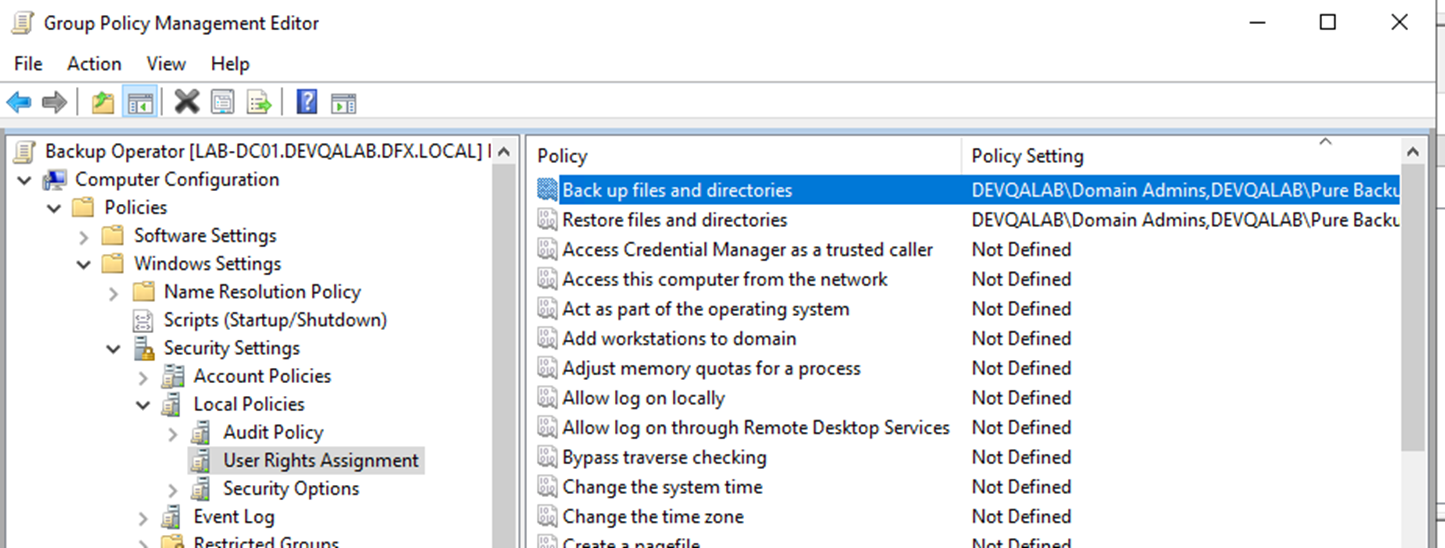
Assign backup and restore privileges to the DSES service account on each FlashBlade server through a GPO policy. Name this GPO Backup Operator and include:
- Back up files and directories privilege
- Restore files and directories privilege
Assign this policy to the FlashBlade Server's Active Directory Computer Name. Apply the privilege directly to the DSES service account or to a group that contains it.
Storage Administrator Account
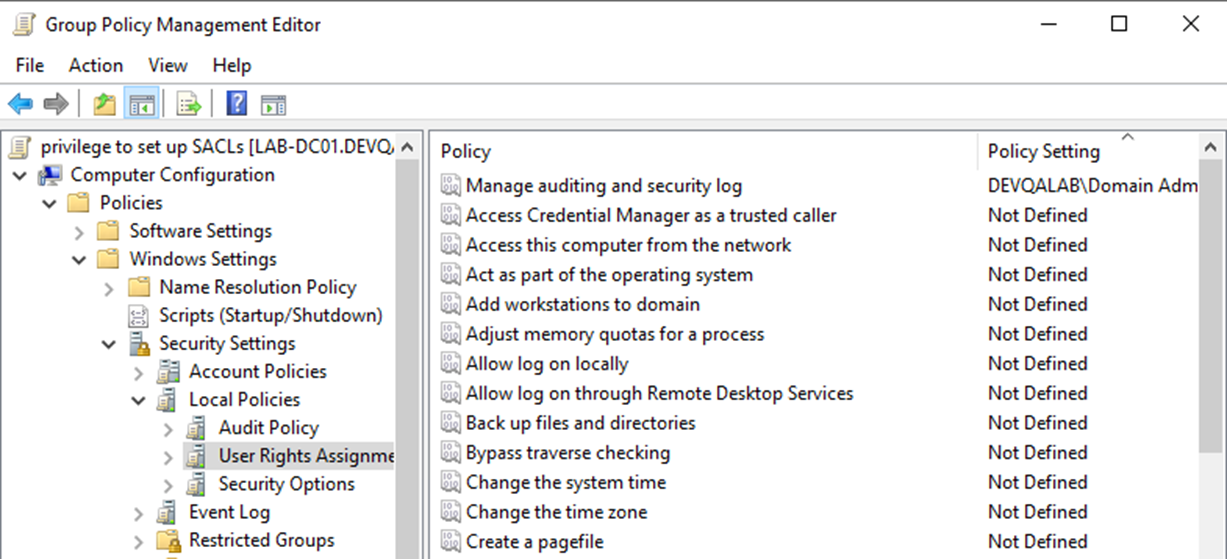
Assign the Manage auditing and security log privilege to storage administrators through a GPO named privilege to setup SACLs. Apply this GPO to each FlashBlade Server's Active Directory Computer Name.
This privilege applies only to storage administrators who configure FlashBlade auditing policies and DSES Audit Tasks, not to the DSES service account.
FlashArray Configuration
- Operating System: Windows Server 2019 or later
- Memory: 16GB+
- CPU: 8
- Disk: Sufficient space for the OS + 10GB reserved for the application and logs (includes SQL Express)
- Connection: Connection to Pure Syslog, 1GB network connection
- Superna Data Security Essentials installer which includes:
- Data Security Essentials Smart Policy Manager
- Data Security Essentials
- Windows Services to Monitor:
- EASE System Manager
- Superna Data Security Essentials Services
- Service Account Privileges: See detailed configuration below for required DSES service account and storage administrator privileges
- Firewall Ports Required
- TCP 445 (SMB)
- TCP 139, UDP 137,138 (SMB Legacy)
- TCP 1433 (SQL connection)
- TCP 514 (syslog)
- TCP 443 (HTTPS)
Service Account Privileges
DSES (Data Security Essentials) Service Account
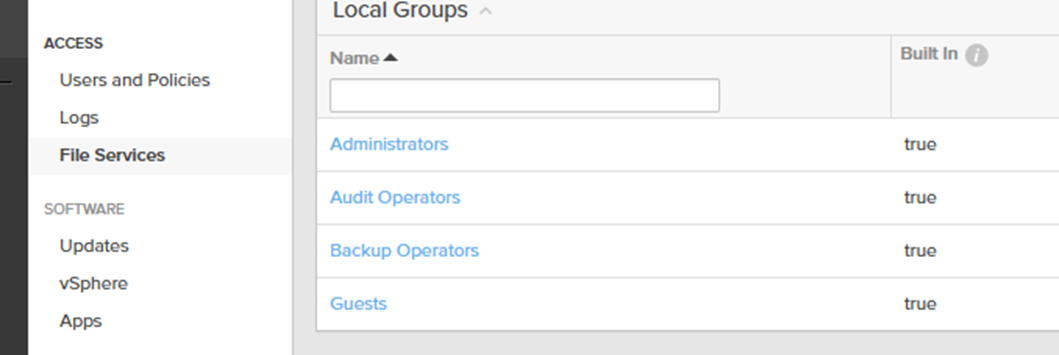
Assign backup and restore privileges to the DSES service account by adding it to the local Backup Operators group on the FlashArray.
Storage Administrator Account
Assign the Manage auditing and security log privilege to storage administrator accounts by adding them to the local Audit Operators group on the FlashArray.
Database Requirements
Database Server Configuration
- Operating System: Windows Server 2016 or later
- Reporting: SQL Server Reporting Services (SSRS) 2016 or newer required to review reports
- Memory: 16GB+
- CPU: 8
Database Sizing Guide
| Environment Scale | Users | Unique Folders | Unique Files | Operations | Supporting Tables | Operations Table | Total DB Size |
|---|---|---|---|---|---|---|---|
| Small | <2.5k users | <2.5M folders | <25M files | ~250M ops | 18 GB | 140 GB | 158 GB |
| Medium | 2.5–5k users | 2.5–5M folders | 25–50M files | ~500M ops | 36 GB | 280 GB | 316 GB |
| Large | 5–10k users | 5–10M folders | 50–100M files | ~1B ops | 71 GB | 564 GB | 635 GB |
| X-Large | >10k users | >10M folders | >100M files | >1B ops | Scales proportionally | Scales proportionally | Contact Superna |
The supporting tables size will stay relatively the same regardless of the number of operations.
Approximately 1 million operations consume about 0.6 GB of storage.